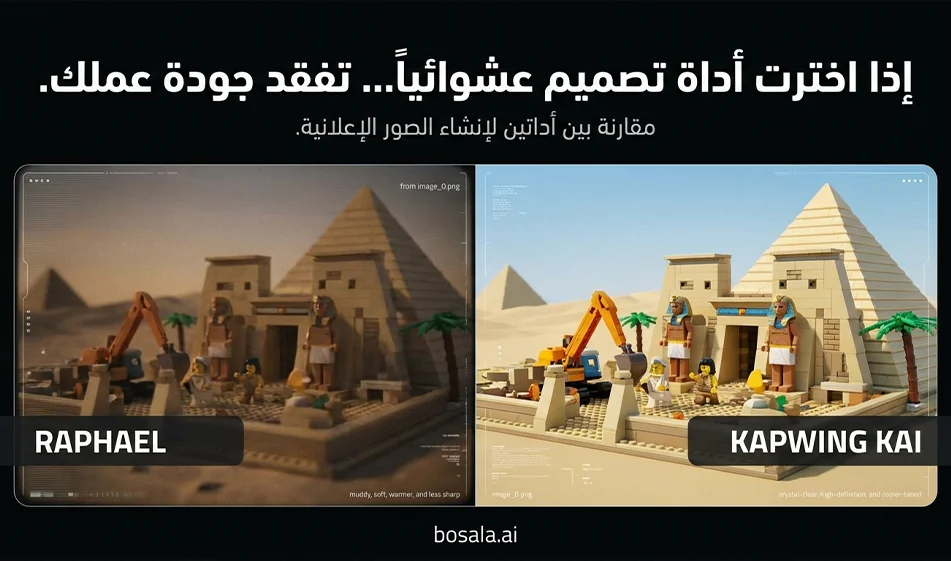
Comparison of Raphael vs. Kapwing KAI in generating images using the same prompt

Comparison of Raphael vs. Kapwing KAI in generating images using the same prompt

Comparison of Raphael vs. Kapwing KAI in generating images using the same prompt

Tool links:
https://raphael.app/ar
https://www.kapwing.com/kai

The idea
We’ll compare performance fairly. Literally the same prompt. Same dimensions. Same number of attempts. Then we’ll pick the winner based on the result.

What we’re actually testing
Adherence to the prompt and details
Quality of plastic materials, lighting, and shadows
The beauty of composition, depth, and cinematic quality
Clarity and lack of distortion of the national flag
Image clarity and the absence of unwanted text or symbols
Speed and number of usable copies per attempt

Steps for a fair comparison in 10 minutes
1
Choose only one prompt for the first experiment, e.g., Egypt
2
Set the aspect ratio to 9:16
3
Generate 4 versions in Raphael and 4 versions in Kapwing KAI
4
Choose the best version from each site
5
Compare the two versions according to the criteria list above
6
Repeat the same steps for a second prompt, such as Algeria or Saudi Arabia, to confirm

Step-by-stepguideon how to create images with Raphael
1
Open the website and go to the image generation page
2
Select the "Text to Image" generation method
3
Set the aspect ratio to 9:16 if aspect ratio options are available
If there is no clear option, leave it as is and type " vertical 9:16 , which is already included in our prompts
4
Paste the entire prompt as is into the description field
5
Start with a small number of copies, just 2 to 4 copies
6
Click "Generate" and wait for the results
7
Choose the best image and download it in high quality

Tip from Bousla to improve Raphael’sresults
If the scene looks cluttered or has too many elements, add just one sentence at the end of the prompt
clean composition, fewer props, focus on landmark and minifigs
If unwanted text appears, add just one sentence
no letters, no numbers, no signage
If the flag is unclear, add just one sentence
flag clearly visible, large, accurate colors, not distorted

Kapwing KAI Step-by-Step Image Creation Guide
1
Open the website and access the image generator within Kapwing KAI
2
Select "Generate Image from Text"
3
Set the aspect ratio to 9:16 if the aspect ratio options are available
4
Paste the prompt as is, then generate 2 to 4 versions
5
Choose the best version, then open it in the Kapwing editorif the edit option appears
6
Here’s Kapwing’s practicalfeature
After selecting the best image, you can prepare it for publishing right away
Quick cropping
Simple sharpening
Add an Arabic title later in a neat font if you wish
7
Download the final image

A tip to improve the results of Kapwing KAI
if you notice that the tool produces many variations but some of them are weak
Use the same prompt and change just one line instead of rewriting everything
For example:
less clutter, single landmark focus
or
strong depth of field, clean lighting

When to choose Raphael and when to choose Kapwing KAI
Choose Raphael if its results are closer to the prompt from the first try and it quickly produces beautiful textures and lighting
Choose Kapwing KAI if you want to generate and prepare the image for quick publishing within the same environment with simple cropping and editing

Tips for a successful series of plastic brick-style landmarks
Keep one clear focal point in each image
Always request that there be no text on the screen
Make the flag large and clear, and place it only in the background
If the characters’ features become distorted, reduce the number of characters in the prompt
Include plenty of props, but don’t overdo it so the shot doesn’t look cluttered

Copy and paste the prompts as they are

General Fixed Template

Create a vertical 9:16 cinematic toy-brick construction scene inspired by animated plastic building block movies. Show a team of adorable brick minifig characters actively building a famous landmark from COUNTRY NAME. The scene should include both primitive and modern construction and transport tools: ropes, wooden rollers, carts, ladders, hammers, cranes, trucks, forklifts, scaffolding, and lifting platforms. The COUNTRY NAME flag should be clearly visible in the background or integrated into the construction site. The landmark must be instantly recognizable and built from plastic toy bricks. Style: cinematic, playful, detailed plastic textures, warm sunlight, expressive minifig faces, depth of field, dynamic composition, family-friendly adventure mood, high detail, glossy toy surfaces, stop-motion-inspired but polished animated look. No text on screen.

Egypt

Create a vertical 9:16 cinematic toy-brick construction scene inspired by animated plastic building block movies. Show a busy team of brick minifig workers building the Pyramids of Giza and the Sphinx in Egypt. The minifigs wear Egyptian-inspired construction outfits and safety helmets. Include a mix of primitive and modern construction methods: wooden rollers, ropes, stone-dragging sleds, ladders, chisels, carts, plus cranes, forklifts, scaffolding, and construction trucks. The Egyptian flag should be clearly visible in the background. The pyramid blocks should resemble sandy plastic toy bricks, and the desert environment should feel warm, golden, and adventurous. Style: playful cinematic plastic-brick world, expressive minifig faces, glossy toy materials, dramatic sunlight, family-friendly epic construction atmosphere, highly detailed, polished animated look. No text on screen.

Dubai

Create a vertical 9:16 cinematic toy-brick construction scene inspired by animated plastic building block movies. Show a team of brick minifig builders constructing the Burj Khalifa in Dubai from shiny plastic building blocks. Include both old and modern transport and construction tools: carts, ropes, pulleys, ladders, wooden supports, alongside futuristic cranes, tower lifts, trucks, and advanced scaffolding systems. The UAE flag should be clearly visible at the construction site. The city background should feel modern, luxurious, and bright, with a playful toy-brick skyline and reflective glass-like plastic pieces. Style: cinematic, energetic, family-friendly, glossy plastic toy textures, expressive minifig workers, heroic construction mood, detailed and polished animated look. No text on screen.

Jordan

Create a vertical 9:16 cinematic toy-brick construction scene inspired by animated plastic building block movies. Show a group of brick minifig characters building Petra in Jordan, carving and assembling the famous Treasury facade using plastic toy bricks in rose-red desert colors. Include both primitive and modern construction tools: ropes, wooden ramps, chisels, carts, ladders, hand tools, plus modern cranes, mini loaders, scaffolding, and transport vehicles. The Jordanian flag should be clearly visible near the site. The environment should feel like a magical desert canyon built from toy bricks, with warm sunlight and adventurous family-friendly energy. Style: cinematic toy-brick adventure, expressive minifig characters, glossy plastic details, rich depth, detailed construction storytelling, no text on screen.

Syria

Create a vertical 9:16 cinematic toy-brick construction scene inspired by animated plastic building block movies. Show a team of brick minifig builders constructing the Umayyad Mosque in Damascus using elegant stone-colored and mosaic-inspired plastic building blocks. Include both traditional and modern construction methods: ropes, wooden carts, ladders, hand tools, stone-carrying systems, alongside cranes, scaffolding, trucks, and lifting machines. The current Syrian flag should be clearly visible in the background: green on top, white in the middle, black on the bottom, with three red stars in the white stripe. The atmosphere should feel historic, warm, and respectful, with detailed archways and courtyard elements made of toy bricks. Style: cinematic, family-friendly, polished plastic textures, expressive minifig faces, detailed animated construction scene, warm golden light, no text on screen.

Algeria

Create a vertical 9:16 cinematic toy-brick construction scene inspired by animated plastic building block movies. Show a lively team of brick minifig workers building the Martyrs' Memorial in Algeria from plastic toy bricks. Include a mix of old and modern construction and transport tools: carts, ropes, ladders, wooden beams, hand tools, plus cranes, scaffolding, heavy trucks, and lifting platforms. The Algerian flag should be clearly waving near the site. The scene should feel proud, sunny, and energetic, with the monument rising dramatically in the background as minifigs coordinate the build. Style: cinematic toy-brick animation, glossy plastic surfaces, expressive worker minifigs, detailed family-friendly construction adventure, polished lighting and depth. No text on screen.

Saudi Arabia

Create a vertical 9:16 cinematic toy-brick construction scene inspired by animated plastic building block movies. Show a large team of brick minifig characters constructing a famous Saudi landmark, such as the Kingdom Centre Tower in Riyadh, using shiny plastic building blocks. Include both primitive and modern building methods: ropes, wooden pulleys, carts, ladders, and hand tools, alongside advanced cranes, glass-lifting platforms, trucks, scaffolding, and modern construction machinery. The Saudi flag should be clearly visible at the site. The environment should feel bright, ambitious, and modern, with a playful toy-brick city atmosphere and dramatic heroic composition. Style: family-friendly cinematic toy-brick world, glossy plastic textures, expressive minifig workers, detailed and polished animated construction scene, warm desert-city lighting. No text on screen.

For more AI tools, visit bosala.ai

April 12, 2026 07:33 PM GMT
About Kapwing

🖼️ Tool Name:
Kapwing

🔖 Tool Category:
AI-powered collaborative video editing platform; primarily under Video Editing, with secondary relevance to Content Creation & Communication, Productivity & Automation, and Marketing & Sales.

✏️ What does this tool offer?
Kapwing is a browser-based collaborative video editor that simplifies content creation for individuals, teams, and brands. It offers:

  • Video editing tools: trimming, resizing, adding subtitles, transitions, effects, and animations.

  • AI tools: auto-subtitles & translations, text-to-speech, background remover, AI script generator, smart resizing, and meme templates.

  • Collaboration features: real-time editing with team members, shared workspaces, and version history.

  • Stock library: built-in media assets (videos, images, sounds, templates).

  • Brand kit: upload and apply logos, fonts, and colors across all projects.

  • Social media optimization: one-click aspect ratio changes for TikTok, YouTube, Instagram, etc.

What does the tool actually deliver based on user experience?

  • Extremely beginner-friendly, yet flexible enough for pro users.

  • Saves hours with AI transcription and auto-resizing for multiple platforms.

  • Ideal for marketing teams, educators, and creators who need fast, collaborative workflows.

  • Highly praised for its team collaboration features and cloud-based accessibility.

🤖 Does it include automation?
Yes — Kapwing includes strong AI-driven automation:

  • Auto subtitles in 70+ languages.

  • AI resizing for multiple social platforms.

  • AI background remover and noise cleaner.

  • Script & text-to-video generation.

  • Smart templates that automate editing for common content types (ads, memes, tutorials).

💰 Pricing Model:
Freemium (Free + Paid subscription tiers).

🆓 Free Plan Details:

  • Export videos up to 4 minutes.

  • Watermark included.

  • Limited access to AI tools and templates.

💳 Paid Plan Details:

  • Pro – $16/month (billed annually):

    • No watermark.

    • 1-hour video exports.

    • Full AI toolset (auto-subtitles, text-to-speech, translate, background remover).

    • 100GB cloud storage.

    • Brand kit support.

  • Business – Custom pricing:

    • Advanced collaboration for large teams.

    • Unlimited storage.

    • Enterprise security, SSO, and priority support.

🧭 Access Method:

  • 100% browser-based, no installation required.

  • Works on desktop & mobile.

  • Cloud projects sync for teams.

🔗 Experience Link:

https://www.kapwing.com

About Kapwing AI Text-to-Video

️ Tool Name: 🖼

The Best Free AI Voice Generators

Categories: 🔖

Audio, Speech, and Music

Text-to-Speech / Speech-to-Text

Audio Cleaning and Mixing

Voice Cloning

Video, Editing, and Motion

Integrations and APIs

️ What does this tool offer? ✏

This isn’t just one tool, but rather a list of the top AI voice generators, showcasing 11 platforms for voice creation, text-to-speech, voiceovers, and voice cloning—each with distinct uses, features, and pricing.

ElevenLabs ranks first with a rating of 4.75 out of 5, and is known for its highly realistic sound quality, voice cloning, control over delivery style and expression, support for multiple languages and voices, as well as instant previews and an API for developers. According to the source, it supports more than 29 languages and over 1,000 voices. The current official pricing page also indicates that there is a free plan and multiple paid plans, with the option to subscribe monthly or annually.

In second place is Descript, with a rating of 4.50 out of 5.It is a platform specifically geared toward content creators, as it goes beyond just voice generation to combine voice cloning, transcription, video and audio editing, and collaboration. It offers AI Speech and voice cloning features, as well as the ability to edit video and audio through text editing. The current official pricing page confirms the availability of a free plan, along with paid plans that include AI-powered audio, video, and editing tools.

LOVO AI ranks third with a rating of 4.25 out of 5,and specializes in creating voiceovers using AI-generated voices, with tools for voice cloning, creating custom voices, and controlling style, emotions, and pronunciation, as well as a text-to-speech editor, sound effects, and an API interface.

Murf AI comes in fourth with a rating of 4.00 out of 5;it is a comprehensive voice-over platform that offers an extensive library of voices and languages, along with voice cloning, voice modification, video editing tools, collaboration features, and an API interface.

In fifth place is Speechify, with a rating of 4.00 out of 5. It focuses primarily on text-to-speech conversion and reading content with a natural-sounding voice. It allows users to choose a voice, control the reading speed, and highlight text while reading, and works across multiple platforms such as iOS, Android, Chrome, and Safari.

PlayHT ranks sixth with a rating of 3.75 out of 5, offering a wide range of voices, languages, and accents, along with tools to control speech speed, pitch, and word emphasis, as well as integration with platforms like WordPress, Shopify, and YouTube, and providing tools for audio editing, podcast hosting, and an API.

In seventh place is Podcastle, with a rating of 3.50 out of 5.It is specifically geared toward podcast creators and combines audio recording and editing, voice-over creation via text-to-speech, episode publishing, and project collaboration.

Listnr ranks eighth with a rating of 3.50 out of 5.It is designed for content creators and podcasters, offering hundreds of voices and multiple languages, as well as controls for speed, pitch, and pronunciation, as well as the ability to create RSS feeds, host podcasts, edit audio, transcribe, and monetize content.

In ninth place is DupDub with a rating of 3.25 out of 5. It is a versatile platform that combines text-to-speech, voice cloning, video creation, and podcasting, It also offers characters and avatars, and supports video dubbing into different languages with lip-sync.

OpenAI TTS comes in tenth place with a rating of 3.25 out of 5;It relies on text-to-speech technologies to create natural and clear voices, with the ability to choose different voices and control certain voice characteristics, in addition to instant generation and API integration.

In eleventh place is Hume AI with a rating of 3.25 out of 5, which focuses on creating voices that are more expressive and better at understanding emotional context. It offers the Octave text-to-speech model, along with EVI for voice conversations, along with APIs and SDKs for developers.

Overall, these tools enable the creation of voiceovers and audio content faster and at a lower cost than relying on voice actors in certain use cases. They can also be used for YouTube videos, podcasts, advertisements, educational content, marketing, dubbing, and multilingual content production.

What does it actually offer based on user experience? ⭐

  • ElevenLabs: The highest-rated option on the list, with a focus on vocal realism, voice cloning, control over expression, and a wide variety of voices and languages.
  • Descript: Suitable for content creators who need to combine voice generation with video and audio editing and transcription. It currently offers AI Speech and voice cloning as part of its plans.
  • LOVO AI: Suitable for creating voiceovers, customizing voices, and controlling emotions and style.
  • Murf AI: Suitable for creating voiceovers using a diverse library of voices and languages.
  • Speechify: Best suited for text-to-speech and converting written content into speech.
  • PlayHT: Suitable for creating AI-generated voices, with a wide range of language, accent, and integration options.
  • Podcastle: Focuses on the needs of podcast creators, including audio recording, editing, and publishing.
  • Listnr: Combines voice generation, podcasting, hosting, and transcription.
  • DupDub: Combines audio, video, dubbing, voice cloning, and avatars.
  • OpenAI TTS: Focuses on text-to-speech and voice synthesis using OpenAI technologies.
  • Hume AI: Focuses on emotional expression and understanding tone and context during voice interactions.
  • These platforms can be used to create voiceovers for videos, advertisements, educational content, and podcasts.
  • The tools vary in the level of control available over speed, voice tone, pronunciation, emphasis, and delivery style.
  • Voice cloning is available in a number of tools, but it varies from platform to platform in terms of the type of cloning, limitations, and usage.
  • Some platforms provide APIs, allowing for the integration of text-to-speech into applications and software workflows.

Does it include automation? 🤖

Yes. All of the tools mentioned rely primarily on AI-driven automation for the text-to-speech process. The user typically enters text or uploads content, selects the appropriate voice and settings, and the system then automatically generates the audio file.

On some platforms, automation extends to voice cloning, dubbing, transcription, audio editing, video generation, lip-syncing, podcast hosting, and API integration.

In Descript, for example, AI-generated audio can be used within video and audio editing workflows, while ElevenLabs allows users to utilize an API directly for audio generation; the API is available across all its plans, including the free plan, with usage-based credits.

Pricing model: 💰

Freemium / Monthly or annual subscription / Pay-as-you-go / Custom Enterprise, depending on the tool.

Pricing varies significantly across platforms; some offer a free plan, some rely on monthly or annual subscriptions, while others use a credit-based system or pay-as-you-go pricing.

🆓 Free Plan Details:

ToolFree Plan / TrialDetails
ElevenLabsFreeThe free plan provides a monthly generation quota, and current information confirms that there is a Free plan priced at $0
DescriptFreeCurrently includes one hour of media per month, 100 AI credits per month, 720p video export, and a limited trial of AI Speech.
LOVO AIUnconfirmedThe source provided does not mention specific details regarding the free plan
Murf AIUnconfirmedThe source provided does not mention confirmed numerical details for the free plan
SpeechifyFreeA free plan is available, but generation and download limits vary depending on usage
PlayHTFreeA free plan is available according to the source, but current usage limits are unclear
PodcastleUnconfirmedThe source mentions paid plans without confirming details about the free plan
ListnrUnconfirmedThe source does not provide confirmed numerical details about the free plan
DupDubFreeAccording to the source, a free plan is available, though full details regarding its limits are not provided
TTS OpenAINo standalone free subscription plan is mentionedUsage is based on a pay-as-you-go model
Hume AIFreeA free plan is available according to the information provided

As for ElevenLabs,the current official billing page confirms that registration automatically starts on the free plan, and subscription plans and a Pay-As-You-Go option are also available.

Paid plan details: 💳

ToolPlans and prices listed in the sourceKey Features
ElevenLabsStarter: $4.17 per month, Creator: $18.33, Pro: $82.50 when billed annually, according to the sourceRealistic voice generation, voice cloning, multiple voices, expression control, API
DescriptHobbyist: $16, Creator: $24, Business: $50 per month when billed annually, based on current pricingAudio and video editing, text transcription, AI Speech, voice cloning, AI tools, and collaboration. The current pricing page confirms these discounted annual rates.
LOVO AIBasic: $24, Pro: $24, Pro+: $75 per month according to the sourceAI voices, voice cloning, style and emotion customization, TTS editor, sound effects, API
Murf AICreator: $19, Growth: $66, Business: $199 per month, according to the sourceVoice library, voice cloning and modification, video editing, collaboration, API, and a custom Enterprise plan
Speechify$11.58 per month when billed annually or $29 per month when billed monthly, according to the sourceText-to-speech, multiple voices and accents, reading speed control, cross-platform compatibility
PlayHTCreator: $31.20, Unlimited: $49 per month when billed annually, according to the source, and a custom Enterprise planMultiple voices and languages, voice control, editing tools, integrations, API
PodcastleEssentials: $11.99, Pro: $23.99, Business: $39.99 per monthAudio recording and editing, TTS, voiceovers, podcasts, publishing, and collaboration
ListnrIndividual: $19, Solo: $39, Agency: $99 per month when billed annuallyVoice generation, over 600 voices depending on the source, multiple languages, podcast RSS, hosting, transcription
DupDubPersonal: $11, Professional: $30, Ultimate: $110 per month when paid annuallyTTS, voice cloning, video, podcasts, dubbing, lip-syncing, characters, and avatars
OpenAI TTSPay-as-you-go; price listed in the source: $0.00008 per creditText-to-speech, multiple voices, instant generation, API
Hume AIStarter: $3, Creator: $10, Pro: $50, Scale: $150, Business: $900 per month, and custom EnterpriseOctave TTS, EVI voice conversations, tone and emotional context understanding, API and SDKs

How to access the tool: 🧭

The toolWebAppAPIBasic Usage
ElevenLabsYesAvailable depending on the productYesVoice Generation and Cloning
DescriptYesDesktop applicationsAvailable for some features/integrationsAudio and Video Editing, Transcription, and Generation
LOVO AIYesUnconfirmedYesVoice-over and voice synthesis
Murf AIYesUnconfirmedYesVoice-over and content creation
SpeechifyYesiOS, Android, Chrome, and SafariUnconfirmedText-to-speech
PlayHTYesUnconfirmedYesTTS and voice synthesis
PodcastleYesUnconfirmedUnconfirmedPodcasts, Recording, and Editing
ListnrYesUnconfirmedUnconfirmedTTS, Podcasts, and Hosting
DupDubYesUnconfirmedUnconfirmedTTS, dubbing, and video
OpenAI TTSYes, via OpenAI products and developer toolsUnconfirmedYesText-to-speech
Hume AIYesUncertainYesExpressive voice and voice chats

Demo link or official website: 🔗

Primary source for this list: Fahim AI – Best Free AI Voice Generators

ElevenLabs: ElevenLabs’ official website

Descript: Descript's official website

About Kapwing AI

️ 🖼Name of the tool:
Kapwing is a digital content editing platform that allows creating and editing videos, photos, and multimedia directly from the browser, and features an artificial intelligence (AI)-powered version to make content production faster and easier, even for those without much editing experience.

🔖 Tool Rating:
Kapwing is categorized as a multimedia editing and content production tool with AI support, combining traditional video, audio, and image editing capabilities with AI tools to create integrated digital content, with the ability to collaborate between team members.

️ ✏What does it offer?
Kapwing offers extensive capabilities including video, audio, and image editing directly from the browser, with tools to trim and merge clips, add text and captions, adjust dimensions for different platforms, and easily reuse content. It also offers artificial intelligence tools such as text-to-video conversion, automatic voiceover generation, automatic subtitles creation, automatic removal of silences and gaps, video resizing for multiple platforms, as well as collaboration and teamwork features on projects.

What does it actually offer based on user experience?
Users praised the ease of using Kapwing to quickly produce high-quality content without requiring much technical expertise, especially in creating videos with automatic subtitles and voiceovers. The tool saves a lot of time and effort for social media content creators, but some users noted that the free plan is limited to short videos and a watermark.

🤖 Does it include automation?
Yes, Kapwing includes AI-powered automation features such as text-to-video, automatic audio generation, adding automatic subtitles, removing silences and gaps, automatically adjusting video dimensions to fit different platforms, as well as smart collaboration tools to speed up the workflow.

💰 Pricing model:
Kapwing adopts a "freemium + subscription" model where it offers a basic free plan with restrictions, and paid plans that provide full access to all editing and AI features, with monthly or annual payment depending on the chosen plan.

🆓 F ree plan details:
The free plan allows video and photo editing, but is limited to video length up to 4 minutes, includes a watermark on videos, and challenges using AI features such as Text-to-Speech and Auto-Subtitles with a limited number of minutes per month.

💳 Paid plans details:
The Pro plan, priced at around $16 per month when paid annually, allows for longer video exports, watermark removal, 4K resolution, more storage space, and full access to AI features. There is also a Business plan for teams with advanced AI features, bulk editing, multilingual dubbing, and video localization. And the Enterprise plan for large companies with custom features, dedicated support, advanced control, and full customization capabilities.

🧭 How to access the tool:
Kapwing is fully accessible via browser without the need to download any software, with the ability to upload files, use AI tools, edit projects, and collaborate between team members in a shared workspace to track edits and produce content in an integrated way.

🔗 Link to the demo or official website:
https://kapwing.com/ai


If