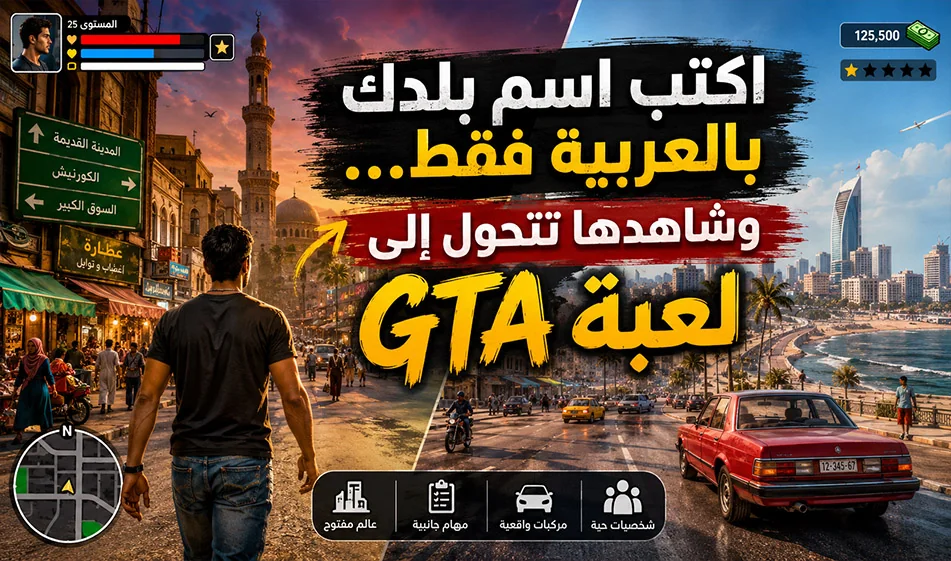
A video prompt that gives you the feel of GTA with an Arabic twist
This prompt generates a video in the style of an open-world game similar to GTA, but with an Arabic and local flavor. All you have to do is copy the prompt, then type the name of the country, city, or region in Arabic, and then generate it within the video tool. The result is a video of a character walking through a local environment full of life, sounds, and details appropriate to the location.
Overview
This prompt serves as a general template. You don’t need to adjust every detail; just change the name of the place in the first line. After that, the prompt will generate streets, shops, clothing, cafes, markets, cars, people, and lighting appropriate for the location you’ve chosen.
Video sites to use and benefit from:
https://www.mindvideo.ai/invitation-landing?utm_source=invitation&invite_code=1BCHJ2HX
Or you can use
https://geminigen.ai/app/video-gen/veo
How to use it?
- Copy the prompt exactly as it is.
- Type the name of the country, city, or region in the first line.
- Upload it to the video tool.
- Select the appropriate aspect ratio.
- Click Generate.
What is the result?
You get a gameplay-style videoof a character walking down a street or through a neighborhood with an Arabic vibe, featuring:
- People and daily activity
- Shops, cafes, and markets
- Cars, taxis, and bicycles
- Realistic street sounds
- Ageneric open-world game-style HUD
Why is this prompt powerful?
Because it keeps the concept consistent while only changing the location. This makes it ideal for creating a series of videos about different countries, cities, and regions without having to write a new prompt each time.
The ready-made prompt
Location: [Type the name of the country, region, or city in Arabic here]
Create a realistic open-world third-person gameplay-style video with a polished stylized game look inspired by modern urban action-adventure games. The video must feel like real gameplay, not photorealistic AI cinema.
Main character:
Create a stylized male game character based on the uploaded reference photo, preserving recognizable facial features and natural face proportions as a high-quality game character. Show him mostly from the back, with slight side angles while walking.
Core idea:
Use only the location written at the top. Automatically build a culturally accurate local environment that matches this place: streets, buildings, shops, cafés, markets, signs, vehicles, architecture, men, women, clothing styles, colors, weather, lighting, and everyday atmosphere. The place should feel authentic, lively, respectful, and visually rich.
Scene:
A continuous third-person gameplay shot of the character walking slowly through a popular local street or neighborhood. He moves naturally with relaxed walking animation, subtle arm movement, random head turns, and the feeling of exploring a living open world.
Environment:
Show realistic local life based on the chosen location: stores, cafés, food stalls, markets, traffic, taxis, pedestrians, families, workers, balconies, street lights, and public activity. If the place is rural, show suitable roads, houses, small shops, natural surroundings, and local people. If it is historic or famous, reflect its visual identity in a respectful, generic way.
Local people:
Show realistic local men and women wearing natural, everyday clothing appropriate to the chosen place, without stereotypes or exaggeration. Include people walking, shopping, talking, sitting, working, drinking coffee, and crossing streets.
Character clothing:
Dress the main character in casual local streetwear that fits naturally with the location and makes him blend into the environment.
HUD:
Add a generic original open-world game HUD, not copied from any specific game.
Top left: “Mission: Explore the city.”
Top right: health and stamina bars with cash display “$00015248”.
Bottom left: a simple mini-map labeled “Current Area”.
Camera:
Use a smooth third-person camera from behind the character, with subtle gameplay sway, gentle follow motion, slight left-right movement, and seamless one-take recording.
World dynamics:
Add believable NPC behavior, moving vehicles, scooters or motorcycles when suitable, shop activity, street conversations, and normal public life.
Lighting and sound:
Match the location with natural daytime, sunset, evening, or night lighting. Add realistic reflections, dust, haze, fog, warm air, or street lights when appropriate. Use ambient sound only: footsteps, traffic, people talking, cafés, markets, birds, wind, and local street life.
Rendering style:
High-quality stylized game rendering, detailed textures, cinematic lighting, HDR look, subtle motion blur, realistic NPC behavior, and polished 4K gameplay aesthetics.
Constraints:
Use only the location at the top. No official logos. No copied game HUD. No violence, weapons, crime, police chases, or unsafe actions. Do not distort the uploaded face. Do not add random text beyond the simple HUD labels. Keep it immersive, respectful, culturally accurate, and suitable for social media.
Quick example
Instead of:
Location: [Type the name of the state, country, region, or city in Arabic here]
You can write:
- Location: Cairo
- Location: Jerusalem
- Location: Jeddah
- Location: Marrakesh
- Location: Nablus
Summary
This prompt is perfect for anyone looking for videos with an open-world game atmosphere featuring an Arabic theme. Just copy it, enter the name of the location, and generate to get a video rich in detail and local atmosphere.