️ 🖼Tool Name:
LucidLink
🔖 Categories:
Digital Asset Management
Cross-platform Publishing and Collaboration
Business and Operations Management
Documents and Software Development Toolkit
Tasks and Projects
Integrations and APIs
💡 What does this tool offer?
LucidLink provides a shared file space that offers instant access to large files on demand, without the need to download them or wait for synchronization to complete, while enabling real-time collaboration with team members from anywhere. The platform allows you to work on files of any size without having to download, sync, or use a VPN, while the file data resides in the cloud and is immediately accessible when needed. LucidLink works much like a local drive, helping to speed up workflows and save time.
The platform uses AWS cloud storage for the Starter and Business plans, while the Enterprise plan offers the option to use AWS or “Bring Your Own Storage.” All plans also provide high-performance storage for real-time collaboration and heavy workloads, as well as zero-knowledge security that encrypts data so that LucidLink cannot view the files.
The platform supports access and permission management through access control and user groups,provides developer tools across all plans, and supports mobile devices on iOS and Android. User management, recovery, and auditing capabilities vary by plan; Enterprise includes multiple admins andSSO integration, while two-factor authentication (2FA) is available on all plans for users who do not use SSO.
LucidLink also offers Filespaces for sharing and organizing files, with support for sharing files and folders via guest links. It also offers snapshot recovery with varying limits across plans, as well as LucidLink Connectand TeamCache as add-ons in the Enterprise plan, anda file system audit trail andBring Your Own Storage as part of the Enterprise plan’s features.
LucidLink is used by teams and companies including USA Today, Minute Media, Spotify, Adobe, Paramount, EVS Engineering, Havas, Torti Gallas + Partners, Designory, and Brut, and holds certifications and accreditations including AICPA SOC 2, GDPR, TPN, ISO, and Zero Knowledge.
⭐ What does it actually offer based on user experience?
- Instant on-demand access to large files without downloading them.
- Work on files without the need for synchronization or a VPN.
- Real-time collaboration with team members from anywhere.
- Use files stored in the cloud as if they were on a local drive.
- Support for files of any size within the plan’s available storage quota.
- High-performance cloud storage for heavy workloads.
- Protect files using zero-knowledge security.
- Manage user and group permissions at the folder level.
- Share files and folders using guest links.
- Supports mobile devices on iOS and Android.
- Restore files via Snapshot recovery according to your plan.
- Provide developer tools across all plans.
- Use of SSO and advanced management features in the Enterprise plan.
- Ability to use your organization’s own storage via Bring Your Own Storage in the Enterprise plan.
🤖 Does it include automation?
The information provided does not mention standalone automation or an automated workflow system. LucidLink primarily focuses on providing instant file access, collaboration, and storage and access management, with developer tools and advanced file management capabilities in the Enterprise plan. Therefore, based on the available information, it cannot be considered a general-purpose automation platform.
💰 Pricing Model:
Paid with a free trial — LucidLink offers a 30-day free trial with no credit card required, along with paid subscription plans: Starter, Business, and Enterprise.Pricing, limits, and features vary depending on team size, storage capacity, and organizational needs.
🆓 Free Plan Details:
| Feature | Details |
|---|
| Access Type | 30-day free trial |
| Price | Free during the trial period |
| Credit Card | No credit card required to start the trial |
| Usage | Sign up, invite your team, and see how the platform fits into your workflow |
| Additional Details | No other specific details regarding the trial’s limitations were mentioned in the information provided |
💳 Paid plan details:
| Plan | Price | Features and Differences |
|---|
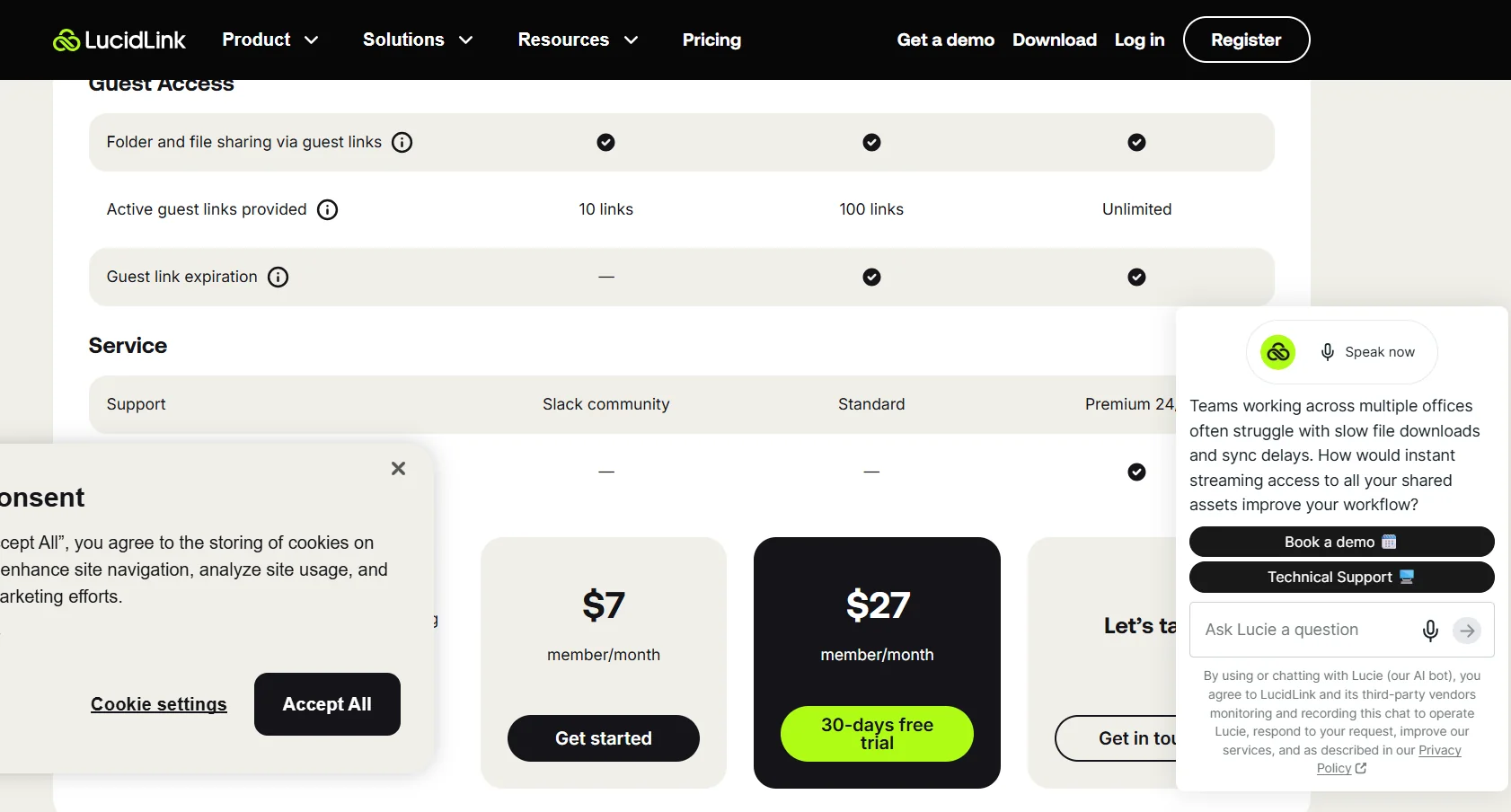
| Starter | $7 per member per month | Designed for small projects and teams just getting started with the platform, this plan includes 100 GB per member in shared storage, with a maximum of 10 members and 1 TB of storage, one Filespace, high-performance storage, zero-knowledge security, access control and user groups, 2FA, developer tools, 10 active guest links per filespace, and a Slack community for support. Additional storage costs $7 per 100 GB per month. |
| Business | $27 per member per month | Designed for distributed teams that need immediate access to shared projects, this plan includes 400 GB per member in shared storage, a maximum of 25 members and up to 10 TB, unlimited Filespaces, high-performance storage, zero-knowledge security, access control and user groups, 2FA, developer tools, 30-day snapshot recovery, 100 guest links per filespace, guest link expiration, and Standard support, with the option to pay via AWS Marketplace. Additional storage costs $8 per 100 GB per month. |
| Enterprise | Custom pricing based on the organization’s needs | Designed for large teams and complex datasets, with unlimited members and storage capacity, a choice of AWS or Bring Your Own Storage, unlimited filespaces, multiple admins, SSO integration, 2FA, Developer Tools, unlimited Snapshot recovery, unlimited Guest links with expiration settings, file system audit trail, Premium 24/7 support, and tailored onboarding. LucidLink Connect and TeamCache are also available as add-ons. |
Additional storage fees apply when the shared capacity included in the plan is exceeded; these are $7 per 100 GB per month for Starter,$8 per 100 GB per month for Business, and are customized for Enterprise.
The included storage capacity for a team of 5 members is approximately 500 GB on the Starter plan and approximately 2 TB on the Business plan.
🧭 How to access the tool:
| How to Access | Details |
|---|
| Desktop App | Available for accessing and working on files |
| Mobile devices | Available on iOS and Android |
| Cloud Storage | AWS in Starter and Business plans; AWS or Bring Your Own Storage in Enterprise plans |
| Developer tools | Available on all plans |
| LucidLink Connect | Available as an add-on in Enterprise |
| TeamCache | Available as an add-on in Enterprise |
| Guest Access | Share files and folders via guest links |
🔗 Trial link or official website:
LucidLink – Official Website and Pricing