Description

️ Tool Name: 🖼

ShortMake

Categories: 🔖

Text and Images to Video
Video, Editing, and Motion Graphics
Video Ideas and Scripts
Generating Images from Text
Text to Speech / Speech to Text
Social Media Templates and Editing Automation
Summaries, Headlines, and Ideas
Music and Sound Effects Generation

️ What does this tool offer? ✏

ShortMake is an AI-powered platform that turns ideas and text into professional short videos in minutes, without requiring advanced editing skills. It is specifically designed to create short-form content for TikTok, YouTube Shorts, Instagram Reels, and Snapchat, and allows users to enter a simple idea so that the AI can create the script, select visual elements, add voice-over and subtitles, and then automatically render the final video.

The platform supports video creation using technologies and models such as Google Veo 3, Kling AI, and Wan AI, It also enables users to turn ideas into engaging scripts and scenarios, add AI-generated voices that match different styles and emotions, and create high-quality images for use in videos.

ShortMake also offers more than 23 different styles for subtitles, allowing users to customize the appearance of the text within the video and make the content more visually appealing. The platform also provides specialized content for creating viral video stories, including AI Fruit Videos, where users can type in a short idea or prompt, and the AI will generate a complete dramatic scenario—including dialogue and transitions—and then create the necessary images for the video.

Custom content can be created for TikTok, YouTube Shorts, Instagram Reels, and Snapchat, with a focus on short vertical videos. The platform states that most videos are created in less than 7 minutes, while the app’s old page indicates that video creation takes less than 8 minutes.

ShortMake currently offers dozens of realistic, AI-powered voices in multiple languages, while custom voice cloning is still listed as an upcoming feature.

The platform also lists more than 10,000 content creators using ShortMake, while the current homepage lists a figure exceeding 200,000 creators, according to the homepage; so it’s not possible to rely on a single figure as the current count without clarifying the discrepancy between the pages. (

What does it actually offer based on user experience? ⭐

  • Users report that ShortMake saves a significant amount of time when turning ideas into videos.

  • Users praised the user-friendly interface and the ability to create TikTok videos without any hassle.

  • Some users noted that the tool delivers professional-looking results without the need to spend hours on editing.

  • One user reported that they used to use ChatGPT to write scripts, then search for images and use CapCut for editing, whereas now they can complete all these steps within ShortMake.

  • Users noted the ability to test various styles, change the voiceover, and adjust the audio all within the same interface.

  • Users praised the video quality and the variety of styles.

  • One user noted that it’s possible to create 3 or 4 different versions of an idea in just a few minutes.

  • Some users were impressed by the options for customizing subtitles.

  • Users feel that the tool automates large parts of the video creation process.

  • Some users noted that more customization options are needed.

  • One user mentioned that some rendering styles still need improvement.

  • Users praised the ShortMake team’s responsiveness on Discord and their willingness to address feedback and suggestions.

Does it include automation? 🤖

Yes. ShortMake automates the video creation process from start to finish; the user writes the idea, then the AI automatically generates the script, selects visual elements, adds voice-over and subtitles, and renders the final video. The official FAQs explain that these steps occur automatically after the idea is entered.

Pricing Overview 💰

ItemDetails
Pricing ModelFreemium / Paid Subscription
Free TrialAvailable without a credit card
Paid PlansBased on monthly credits
BillingMonthly or annual
Annual discount30% when choosing annual billing
Video UsageA 60-second video consumes approximately 100–120 credits
CancellationSubscriptions are non-binding and can be canceled at any time without penalties

🆓 Free Plan Details

ItemDetails
Free PlanAvailable to get started and try out the service
Credit CardNot required ❌
Free CreditsNo specific amount is listed on the current pricing page
Free videosNo specific number has been specified
Create an AccountYou can create an account and access the platform through the official app page

Paid Plan Details 💳

PlanMonthly PriceAnnual PriceMonthly CreditsApproximate Number of Videos*Key Features
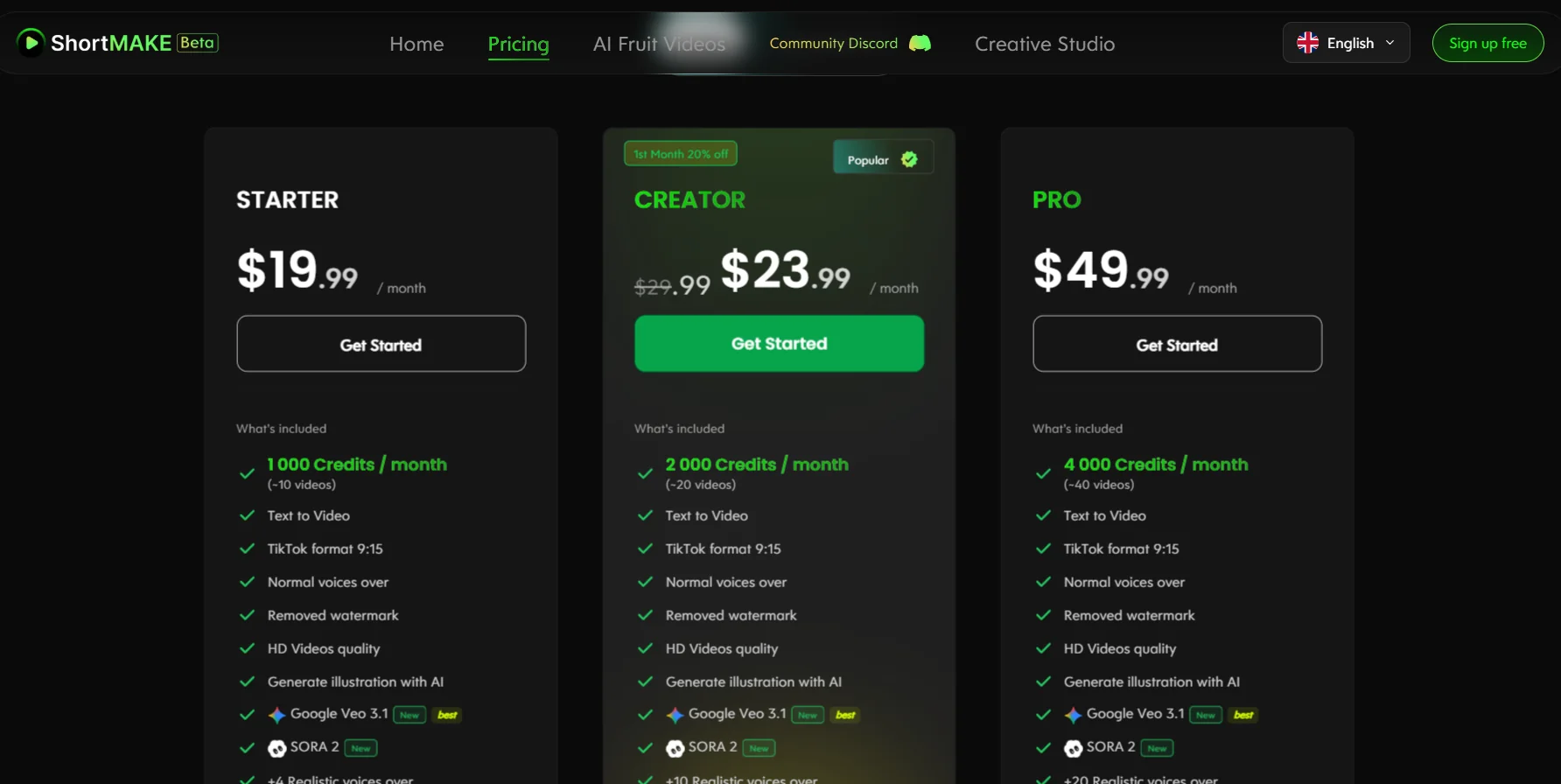
Starter$19.99TBD1,000About 10Text-to-Video, TikTok 9:15 aspect ratio, over 1,000 stored images, standard sounds, 4 realistic sounds, watermark removal, HD, AI-generated illustrations
Creator$29.99$23.99/month when billed annually2,000About 20Text-to-Video, 9:15 TikTok aspect ratio, over 1,000 stored images, standard sounds, 10 realistic sounds, watermark removal, HD, AI-generated illustrations
Pro$49.99Unconfirmed4,000About 40Text-to-Video, TikTok 9:15 aspect ratio, over 1,000 stored images, standard sounds, 20 realistic sounds, watermark removal, HD, AI-generated illustrations

* The number of videos is an estimate, based on a consumption of approximately 100–120 credits per 60-second video.

Billing and Discounts 📅

ItemDetails
Monthly BillingAvailable
Annual BillingAvailable
Annual Discount30%
Starter – Annual PriceUnconfirmed based on available information
Creator – Annual Price$23.99 per month when billed annually
Pro – Annual PriceUnconfirmed based on available information
CancellationYou can cancel your subscription at any time without penalties
PromotionsLimited-time offers appear occasionally, but it cannot be confirmed whether the 20% discount on Premium applies to current plans

Credits System 🎯

PlanMonthly CreditsEstimated 60-second videos
Starter1,000About 8–10 videos
Creator2,000About 17–20 videos
Pro4,000About 33–40 videos

How to access the tool: 🧭

  • Web: ShortMake can be used via its official website.

  • Creative Studio platform: You can access the video creation environment through the ShortMake app.

  • Sign-up: You can create a free account and sign up using Google or your email address.

  • Discord: The platform offers a Discord community for communication, support, and sharing feedback.

  • API: There is no confirmed information on the official website regarding the availability of an API for users.

Trial link or official website: 🔗

ShortMake Official Website

Get started with ShortMake for free

ShortMake’s official pricing page

Pricing Details

The image shows the prices of three different monthly subscription plans: the Starter plan costs about $19.99 per month, while the Creator plan costs $23.99 per month after the discount, down from the original price of $29.99, Finally, the advanced Pro plan costs $49.99 per month.