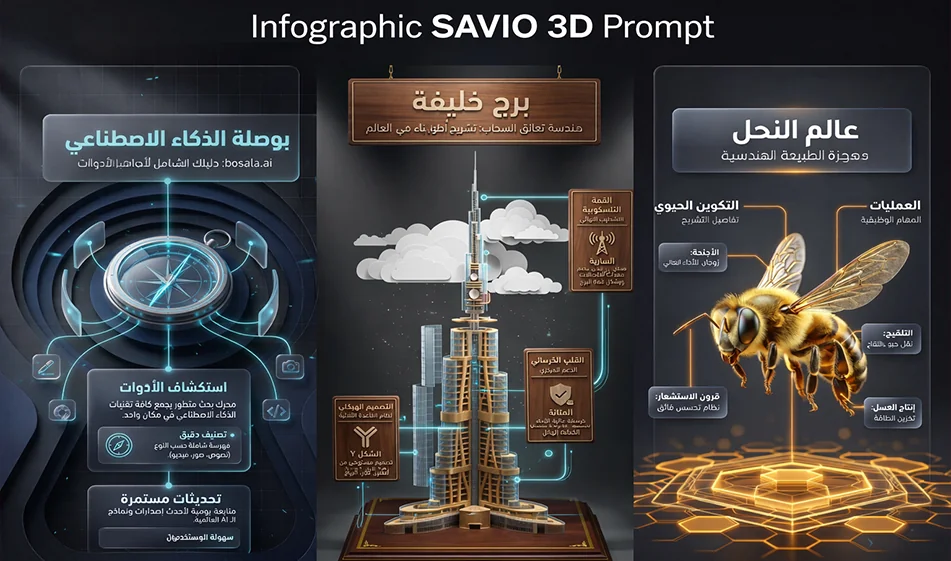
Do you want to design realistic and professional 3D infographics... just from the topic name and with the click of a button?

Do you want to design realistic and professional 3D infographics... just from the topic name and with the click of a button?

Tip: If you're wasting time arranging infographic elements and choosing icons and colors, there's a faster way: the Infographic SAVIO 3D Prompt templatein Google AI Studio automatically prepares a complete prompt for you, then you copy it to NanoBanana to get ahyper-realistic, ready-to-publish3D infographic.

How does it work? (Clear steps)

  • Step 1: Open the SAVIO 3D Prompt Infographic templatein Google AI Studio
  • Step 2: Write only the topic name (e.g., proper nutrition, cybersecurity, digital marketing, etc.).
  • Step 3: Choose the infographic format you want (timeline, steps, comparison, statistics, pyramid, map, etc.)
  • Step 4: The template gives you a prompt ready to copy
  • Step 5: Copy the prompt and paste it into NanoBanana.
  • Result: A three-dimensional infographic that is visually organized, realistic, and suitable for social media

Why is this so powerful?

  • It saves you time designing from scratch
  • It gives you a ready-made "structure": title + sections + professional visual arrangement
  • It helps you quickly create multiple versions of the same topic (and choose the best one)
  • You can start with a free trial at first, depending on each platform's policy

Golden tip for the best results

  • Make your topic clear and specific (don't write a title that is too general)
  • Choose only one format (comparison or steps... don't mix more than one format)
  • If the text is too long: ask for "short points" and "more white space" in the next version
  • Write your final texts later if necessary, to ensure excellent Arabic formatting

Link to the template for testing

https://bit.ly/4q207Kq

If you want the prompt text and the ready-to-copy template with ready-made examples for several topics, write the word "bosala" in the comments and I will send it to you.
For more artificial intelligence tools: bosala.ai

January 29, 2026 08:35 PM GMT
About Google Gemini

🖼️ Tool Name:

Google Gemini 

🔖 Core Classifications:

  • Generative AI & Agents: Capable of planning and executing logistics (e.g., "Plan my trip, book the hotel, and email the itinerary to my team").

  • Multimodal Mastery: Native understanding of text, 60fps real-time video, 3D spatial relationships, and high-fidelity audio.

  • Ecosystem Integration: Deeply embedded into Android, Google Workspace, and the new Gemini for Home(replacing legacy Google Assistant).

✏️ Key Features:

  • Gemini 3.0 Pro & Flash: Features "Built-in Reasoning" by default, meaning the AI automatically "thinks" through complex logic without needing a manual toggle. It handles a context window of 2 million+ tokens(entire codebases or hours of video).

  • Gemini Live (Visual Interface): You can now share your camera or screen in real-time. Point your phone at a broken appliance, and Gemini will provide an augmented reality (AR) overlay to show you how to fix it.

  • Deep Research Mode: A specialized tool that performs autonomous, hours-long web research, synthesizing thousands of sources into a professional report with verified citations.

  • Audio Overviews: Powered by NotebookLM technology, Gemini can turn any PDF, Doc, or Slides presentation into a two-person, conversational podcast episode.

  • Veo 3 & Nano Banana: High-end video generation (up to 8-second clips with sound) and state-of-the-art text-to-image editing are now integrated directly into the chat.

⭐️ User Experience Highlights:

  • "The Personal Assistant": Android users use Gemini to manage their calendars, summarize missed WhatsApp threads, and even draft replies that match their personal writing style.

  • "The Research Partner": Students and researchers use Gemini 3's "Multi-document insights" to find contradictions or patterns across hundreds of research papers simultaneously.

💵 Pricing Plans (2026 Status)

PlanPrice (Approx.)Key Features
Gemini Free$0Access to Gemini 2.5 Flash, basic Workspace integration, and limited image generation.
Gemini Advanced$19.99 /moAccess to Gemini 3 Pro, Deep Research, Veo 3 video, and 2TB Google One storage.
Google AI Ultra~$29.99 /moPriority access to experimental models, higher video/image limits, and advanced "Agent" features.
Workspace Business$20 - $30 /userEnterprise security, AI in Docs/Gmail, and Workspace Studio for automating business flows.

🎁 Is the free version a trial or completely free?

It is Free Forever. Google provides a robust free tier using its "Flash" models, which are optimized for speed and daily tasks. While free users don't get the "Deep Research" or "Veo 3" video tools, they still benefit from a massive context window and the ability to analyze files and photos.

⚙️ Access or Source:

  • Official Website

  • Mobile: The default assistant on most 2026 Android phones; available as an app on iOS.

  • On-Device: Gemini Nano runs locally on high-end phones for private, offline summaries and translations.

🔗 Experience Link: 

https://gemini.google.com/

About Google AI Studio

️ 🖼Tool name:
Google AI Studio

🔖 Tool category:
• Automation and smart agents
• Integrations and APIs
• No-code workflows
• Automation robot creation
• RPA and repetitive tasks
• Predictive analytics and applied machine learning
• Data and analytics

️ ✏What does this tool offer?
Gemini API provides access to a wide range of Google AI models for developing smart applications that include text, images, video, audio, and search. The platform offers advanced capabilities such as generation, multimodal understanding, automation, context caching, and integration with Google tools such as Search and Maps, along with support for data analysis tools and intelligent agent operation.

What does it actually offer based on user experience?
The Gemini API provides a flexible experience for quickly creating smart applications with powerful options for scaling. Available models include Gemini 3 Pro, Gemini 2.5 Flash, and Gemini 2.0 Flash-Lite to meet performance, speed, and cost requirements. It supports the creation of intelligent agents for video processing, audio, computer control, and search, with the ability to embed ready-made tools directly into applications.

🤖 Does it include automation?
Yes, tasks such as search, media processing, video and image creation, and complex instruction execution can be automated via intelligent agents, with full context management and data caching.

💰 Pricing model:
Gemini API is pay-as-you-go with free limits to try out models before scaling up.

Free plan:

  • Limited access to some models

  • Free input and output tokens

  • Free access to Google AI Studio

  • User content may be used to improve Google products

Paid plan:

  • Higher limits for production models

  • Context caching to speed up processing

  • Batch API with 50% discount

  • Access to advanced models without using content to improve products

Enterprise Plan:

  • All Paid features

  • Dedicated support and direct communication channels

  • Advanced security and regulatory compliance

  • Provisioned throughput

  • Volume-based discounts

  • ML Ops and Model Garden features

https://ai.google.dev/gemini-api/docs/pricing?utm_source=chatgpt.comExperience Tool link

About Google Imagen 3

🖼️ Tool Name:
Google Imagen 3

🔖 Tool Category:
AI-powered text-to-image generation model; it falls under the category of advanced generative image models designed for high-quality, photorealistic, and artistic image creation.

✏️ What does this tool offer?
Google Imagen 3 is Google’s latest text-to-image generation model, designed to produce highly detailed, realistic, and stylistically accurate images from natural language prompts. It focuses on superior image quality, better text rendering inside images, improved realism, and strong alignment with user prompts, making it suitable for both creative and professional use cases.

What does the tool actually deliver based on user experience?
• High-quality text-to-image generation with strong prompt adherence
• Photorealistic and artistic image outputs
• Improved handling of lighting, textures, and fine details
• Better text rendering within images compared to earlier models
• Support for multiple visual styles (realistic, illustration, concept art, etc.)
• Integration within Google’s AI ecosystem (Vertex AI, Gemini tools)

🤖 Does it include automation?
Yes — Google Imagen 3 relies on advanced automation, including:
• Automated image generation directly from text prompts
• Intelligent prompt interpretation and visual composition
• Style and quality optimization handled automatically by the model
• Scalable image generation through APIs and cloud infrastructure

💰 Pricing Model:
Usage-based (via Google Cloud / Vertex AI)

🆓 Free Plan Details:
• No standalone free public plan
• Limited access may be available through Google AI demos or trials
• Requires a Google Cloud account for API usage

💳 Paid Plan Details:
• Pay-as-you-go pricing based on image generation usage
• Pricing varies by resolution, volume, and integration method
• Enterprise-ready pricing through Google Cloud

🧭 Access Method:
• Google Cloud Vertex AI
• APIs & SDKs via Google Cloud
• Integrated into Google AI products and tools

🔗 Experience Link:

https://ai.googleblog.com