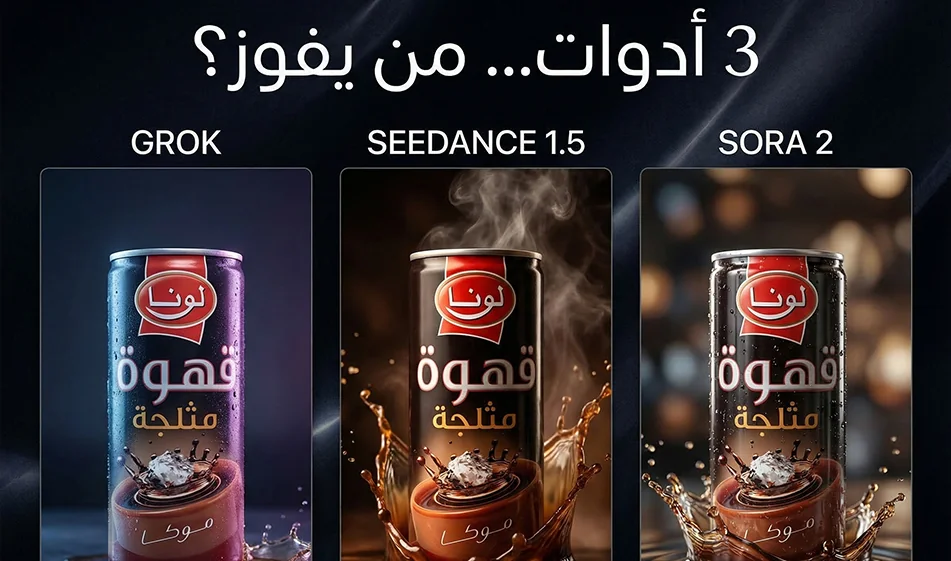
Comparison of Grok ,Seedance 1.5 ,andSora 2 when using the same prompt and the same product to create an advertising video
The idea here isn’t“which tool is better overall,” but rather:
When using the same product image, the same prompt,and the same settings, which tool gives you a smoother, clearer ad video that’s closer to real-life footage without distortion?
This comparison will help you choose the right tool based on your ad type: fast-paced and trendy, cinematic and realistic, or static product shots.
Watch the video:
1) Why do we use the same prompt and the same product?
Because any difference in the text or image makes the results unfair.
A fair comparison gives you a clear answer:
- Who determines the product’s appearance and label?
- Who maintains the lighting and shadows?
- Who provides cinematic camera movement without shaking or flickering?
2) Compass settings for a fair comparison
Before rendering in any tool, set these values:
- Aspect ratio: 9:16
- Duration: 8 seconds
- Video from product image if available
- No text within the video
- Only one camera movement
Then apply the exact same prompt to all three tools.
3) How do you briefly understand the three video tools?
Grok
- is very well-suited for“trendy” and quickshots, andfor quickly generating a variety of ideas.
- It deliversexcellent results when the scene is simple and camera movement is minimal.
’sstrengths:speed, a fun experience, and quick iteration.
’scommon challenge:With complex scenes or many details,you may need to regenerate the scene to achieve better stability.
Seedance 1.5
- Tends to produce“realistic commercial” videoswith a good cinematic feel.
- Strong in scenes that rely on realistic lighting and beautiful gradients.
Strengths
: Realism, good lighting, and clean commercial shots.
’sCommon Challenge: It sometimes requires very precise calibration to minimize distortion, especially on posters.
Sora 2
- It often excels when you want a cohesive cinematic shot and greater stability in“motion logic.”
- Excellent for shots that need a real cinematic feel, depth, and realistic motion.
Strengths
:High cinematic quality and more cohesive motion.
’scommon challenge: It may be slower or require more precise settings to achieve a perfect result.
4) One prompt template for comparison (copy it as is)
Replace“product” with the actual product name:
An 8-second9:16 vertical productad video .
A close-up of the product on a clean studio table with a simple background.
Soft studio lighting, realistic shadows, and a slight reflection on the surface.
A very slow zoom-in camera movement with a slight rotation around the product.
High detail, natural colors, product clearly centered.
No text within the video, no watermarks, no shaking, no flickering, no distortion of the product or label.
5) Judging Criteria: Who Wins the Ad Video?
After creating 3 videos, evaluate them using this checklist:
- Product and label stability
Are the logo and label clear and consistent? - Smoothness of movement
Is the camera movement smooth and shake-free? - Lighting Stability
Are there any flickers or sudden changes in lighting? - Realism of Shadows and Reflections
Does the product look like a real“object” or a“sticker”? - Ready for publication
Is the video ready to go or does it need major editing?
6) What should you do if the results are poor?
Don’t change the entire prompt. Apply the compass rule:
- Modify just one line, such as:
- Make the camera movement slower
- Keep the product and label the same
- Reduce shaking and flickering
Then regenerate just once.
7) Quick Compass Summary
- If you want a fast, trendy video with lots of effects: Grok isexcellent.
- If you want a clean, realistic ad shot with good lighting: Seedance 1.5 ispowerful.
- If you want a more cinematic feel and smoother motion: Sora 2 usually comes out on top.
But the final decision isn’t based on expectations—it’s based on experience: usethe same prompt and the same product, then choose the winner based on the criteria above.
For more AI tools: bosala.ai