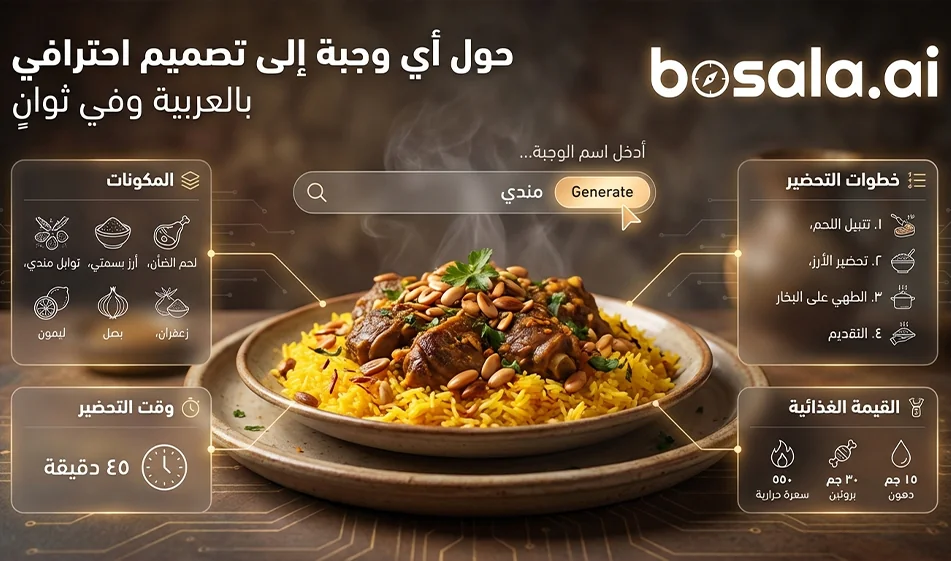
One prompt turns any meal into a ready-to-publish Arabic infographic
The Idea
Instead of writing a long recipe description, use this prompt as a ready-made template
Just type in the name of the dish
and an infographic image will be generated automatically
It shows the dish in an appetizing way
and lists the ingredients and quantities in Arabic
and a summary of the preparation method in numbered steps
along with information such as calories, cooking time, and number of servings
All of this in a clean, modern design suitable for social media
When is this template useful
For cooking and recipe pages
For restaurants that want to share recipes or informative posts
For health content explaining calories and preparation time
For nutrition coaches who want quick and eye-catching posts
Step-by-step instructions
1 Open the image generator you use
2 Paste the prompt as is
3 Replace "favorite food" with the name of the meal you want
4 Generate only two images, then choose the best one in terms of
clarity of the Arabic text
layout
the beauty of the dish's image
5 If the Arabic text is crowded
ask for a re-generation to reduce the text and shorten the steps
and don’t change the entire prompt; just add two lines like
Keep the text very short and clear
Do not exceed 6 ingredients and 5 steps
Tip: Use a compass for a cleaner result
Choose well-known meals so the ingredients come out correctly
Make the dish name very clear
such as Chicken Maklouba
Chicken Shawarma
Pasta with Béchamel
Fattoush salad
Pancakes
Important Note
Request that all text be in Arabic only
and do not use any English words at all
And request no watermark
Ready-made prompt
Copy and paste it as is, then just replace the name of your favorite food
A recipe infographic with a very modern and clean look. Highlight the name of your favorite food in its final form—sliced, glazed, or already served—slightly tilted or from a perspective to add depth. Arrange the ingredients, steps, and tips about the dish in a dynamic editorial layout, avoiding a static composition in the top view.
Mandatory Language: All text, titles, labels, descriptions, numbers, captions, buttons, and any typographic elements must be exclusively in Arabic.Do not use English or any other words in any part of the image.
Ingredients Section: Include icons or small illustrations for each ingredient, including quantities. Organize them into groups, lists, or circular flows that visually connect to the main dish.
Step Section: Present the preparation in numbered panels with arrows or lines indicating the logical sequence around the panel.Include small supporting icons—knife, frying pan, oven, timer—when it makes sense.
Optional Additional Information Total calories, prep time, cook time, number of servings, and spice level can be displayed as clean labels or badges near the dish.
Visual Style Blend editorial information with lifestyle photography Natural, vibrant food colors, soft shadows, minimalist vector icons, modern typography, and panels with soft gradients or a glass effect Use bold colors to highlight important data such as calories and prep time.
Guidelines Feature the finished dish as the main focal point or perspective. Organize ingredients and steps seamlessly. Clear visual hierarchy: dish first, then steps, then ingredients, then additional information.Sufficient negative space to keep the design airy and readable.
Lighting and Background Soft, natural studio lighting. A textured or subtly gradient background to convey a distinctive editorial look.
Outputs 1080×1080 resolution. Optimized for social media without a watermark.
Compact Compass Version If the results are cluttered
If you notice that the tool is generating too much text or the Arabic font is too small
Add this line at the end of the prompt before generating
Keep the text very short and clear, with no more than 6 components and 5 steps, and use a large, legible Arabic font
Conclusion
This template saves you hours of design and writing. Just type in the name of the meal and generate a ready-to-publish Arabic infographic.