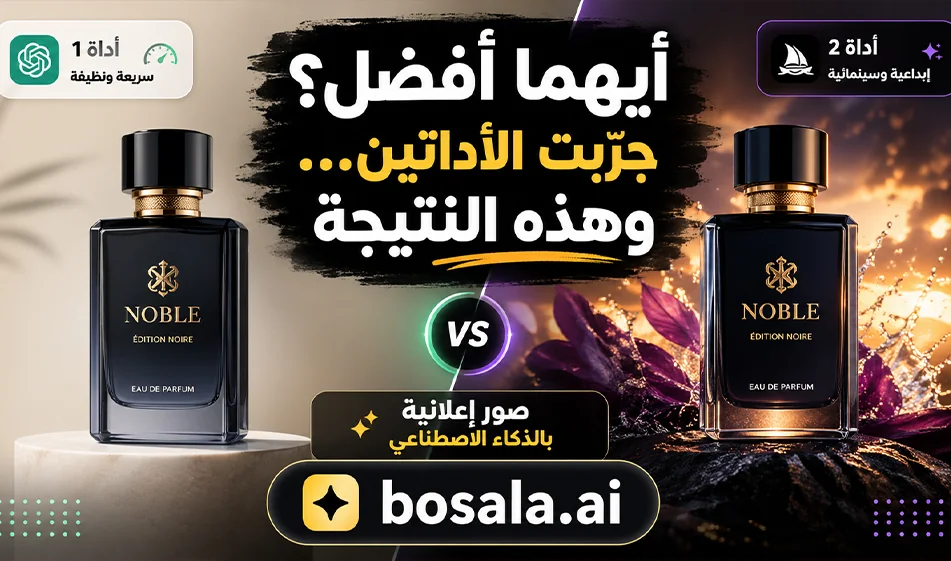
A Comparison of PicLumen and Bylo AI for Creating AI-Powered Advertising Images
If you’re looking for a tool to help you quickly create professional advertising images, both PicLumen and Bylo AI offer useful solutions for designers, content creators, and entrepreneurs. Both tools can convert text descriptions into images, but the real differences lie in how they’re used, how easily you can get results, and the level of control you have over the final image.
Websites:
https://www.piclumen.com/ai-image/
https://bylo.ai/features/gpt-image-generator
PicLumenis a great tool for anyone who wants to generate advertising images quickly and directly. Its core concept involves writing a description of the desired image, then receiving multiple results that can serve as a strong starting point for any marketing idea. It is therefore suitable for quickly creating product images, visual ads, social media posts, and campaign concepts. What sets it apart is its convenience during the idea-generation phase, especially if you want to test multiple visual styles for the same product, such as an ad for a perfume, a beverage, a beauty product, or a meal. It’s also ideal for those who want quick results without getting bogged down in details from the start.
Bylo AI , on the other hand, leans more toward being a flexible and comprehensive tool for both generation and editing. It doesn’t just focus on creating an image from text; it gives the user broader options to control the outcome, such as editing the image, refining it, changing certain elements, or enhancing the ad scene after generation. This makes it suitable for users who don’t just want a rough draft but aim for a more precise and professional result. Therefore, it can be considered a good tool when you need to refine an existing advertising concept, edit a product image, or experiment with different visual styles to achieve the best outcome.
Prompts:
First: Potato Chip Bag Prompt
) Potato Chips — Realistic
Create a vertical 9:16 ultra-realistic commercial image of a premium potato chip bag as the hero product, placed in the foreground with crispy golden potato chips flying around it. Show two happy children, a boy and a girl, interacting naturally with the product in a fun, playful scene. The children are smiling and excited, one holding a chip and the other looking at the bag with joy. Bright, vibrant colors; modern advertising style; clean background with an energetic snack vibe; realistic skin details; realistic product photography look; cinematic lighting; shallow depth of field; highly detailed packaging; premium food ad composition.
) Potato Chips — Cartoon
Create a vertical 9:16 cartoon-style advertisement for a potato chip bag featuring cheerful children in a colorful, playful environment. The chip bag should be large and clearly visible in the center, surrounded by floating potato chips and fun snack elements. Show cute cartoon kids smiling, laughing, and holding chips. Use bright colors, smooth shapes, expressive faces, a playful background, a clean composition, a fun commercial poster style, highly appealing to kids, and polished cartoon illustration.
) Potato Chips —3D
Create a vertical 9:16 premium 3D commercial render of a potato chip bag with happy stylized 3D children beside it. The chip bag should be large, glossy, and eye-catching, with crispy chips bursting out dynamically. Show one child holding the bag and another reaching for a chip with a joyful facial expression. Modern 3D advertising style, soft studio lighting, vibrant yellow and orange tones, clean background, polished surfaces, high-end product presentation, cute 3D characters, detailed textures, playful and premium.
Second: Prompt for a strawberry milk juice package
) Strawberry Milk Juice — Realistic
Create a vertical 9:16 ultra-realistic commercial image of a strawberry milk juice pack as the hero product, with fresh strawberries and milk splashes around it. Show two happy children enjoying the drink in a bright, cheerful setting. One child is holding the strawberry milk pack and smiling, while the other is reacting with excitement. The product should be large, clear, and attractive in the foreground. Use premium advertising lighting, realistic details, a vibrant pink and white color palette, a clean composition, and a cinematic food photography style—highly detailed and appealing.
) Strawberry Milk Juice — Cartoon
Create a vertical 9:16 cartoon-style advertisement for a strawberry milk juice pack featuring cute, happy children in a playful strawberry-themed scene. The product should be large and centered, with floating strawberries, milk splashes, and fun cartoon energy surrounding it. Show smiling cartoon children holding and enjoying the drink. Use bright pink tones, a soft, rounded illustration style, a clean layout, joyful expressions, a playful background, and a highly attractive, polished commercial illustration.
Strawberry Milk Juice —3D
Create a vertical 9:16 premium 3D commercial image of a strawberry milk juice pack featuring adorable stylized 3D children. The pack is the main product, large and glossy, surrounded by strawberries and swirling milk splash effects. Show one child happily drinking and another playfully hugging the juice pack. Use modern 3D rendering, a clean studio-like background, premium soft lighting, polished textures, a pink and white color palette, cute expressive characters, and a high-end product advertising style.
In terms of ease of use, PicLumen is ofteneasier to start with, as it’s suitable for those who want to jump right into generation. You enter the idea, wait for the results, and then choose what works for you. Bylo AI , on the other hand, may be better for those who want more control, or for those who want an additional stage of editing and refinement after getting the initial idea.
When it comes to creating product advertising images, PicLumen isvery well-suited for generating quick, varied shots of the same product. So if you have a product like a perfume bottle, an energy drink, or a food item, you can use it to experiment with various backgrounds, different lighting, and multiple angles, until you get more than one visual concept for your campaign. Bylo AI , on the other hand,is more powerful in situations where you need to refine the result, re-adjust the scene, or handle image elements with greater precision.
In terms of control and editing, Bylo AIis the preferred choice, as it gives the user more room to develop the image rather than just generating it. This is very important in advertising, because a successful ad image depends not only on aesthetics but also on precision—such as the product’s shape, the placement of elements, the background, the lighting, and how the visual message is highlighted. So if you need a more controlled final result, you’ll likely find that Bylo AI serves you better.
In the realm of social media, PicLumen isexcellent if you want quick, eye-catching images for posts, content covers, or daily campaign ideas. Bylo AI , on the other hand, is more suitable if you want a more carefully crafted and detailed image, or if you’re working on an ad that requires more visual refinement before publication.
To understand the difference in practice, imagine you want to design an ad image for an energy drink. If you start withPicLumen, you can write a clear description of the image, such as: an energy drink bottle in a cinematic shot with water droplets, strong lighting, and a dark background, to quickly get several different results. Then, if you find a good result but it needs tweaking, improving, or rearranging some elements, that’s where Bylo AI comes inas a second step to refine the image and bring it closer to a ready-to-use ad.
So, when we ask: Which one is better? The answer depends on your specific use case. If you want speed and to generate lots of ideas , start with PicLumen. If you want more control and finer adjustments, choose Bylo AI. But if you truly want the best results in advertising, it’s best to use both tools in an integrated way: start by generating the idea inPicLumen, then move to Bylo AI to refine and develop the image.
Bousla’s Tip: When creating an advertising image, don’t just write a general description like: “I want an ad for a product.” It’s best to write a detailed description specifying the product type, background, lighting, shooting angle, desired mood, and target audience. For example: “Luxury ad for men’s fragrance, cinematic lighting, dark background, glass reflections, suitable for social media.” The clearer the description, the closer the result will be to a real, professional ad image.
Conclusion:
PicLumen is suitable for quickly generating ad images and testing multiple visual ideas, while Bylo AI is suitable for deeper control, editing, and image refinement. If you work in marketing, content creation, or advertising, combining these two tools can give you a stronger and more professional result.