AIReel Review: A One-Stop Platform for AI-Powered Video and Image Generation
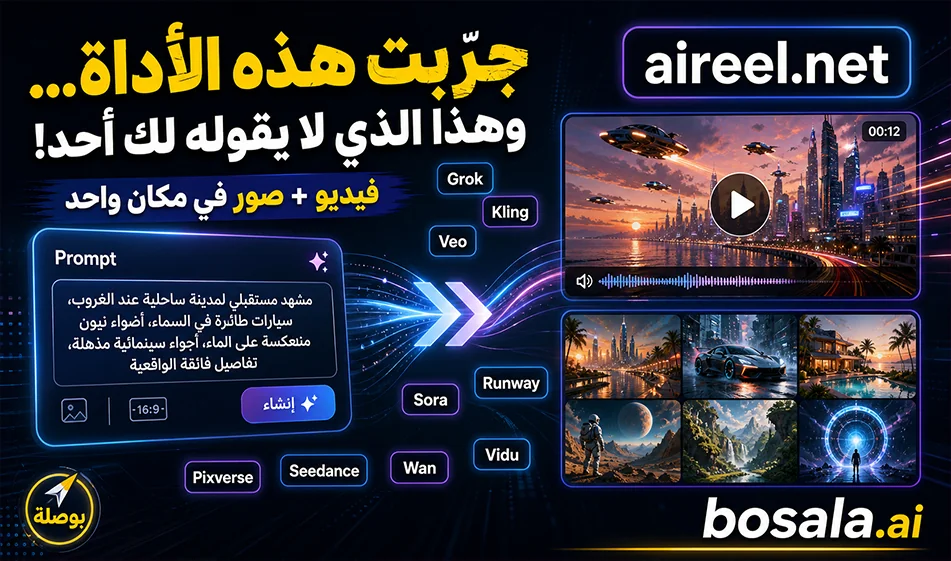
AIReelis a comprehensive tool for content creators who want to quickly generate videos and images from text or images. Instead of using multiple sites to try out different models, the tool brings together a collection of powerful and popular models for video and image generation, such asGrok , Kling, Pixverse, Seedance, Sora , Veo, Wan, Vidu, Runway, and others.
The tool’s concept is simple: you write a prompt or upload an image, then select the appropriate size and model, and finally click “Generate.” This makes it ideal for content creators, marketers, designers, entrepreneurs, and anyone looking to quickly produce visual content for social media or advertising.
Link: https://www.aireel.net/image-to-video
What does the tool offer?
AIReel offersmultiple ways to create visual content, including generating video from text, converting images to video, generating images from text, and transforming an image into a new one. This means you can use it to create a cinematic scene from a text description, animate a product image, generate an advertising image, or reimagine an existing image in a new style.
The tool also includes multiple models, giving users the freedom to choose the most suitable one based on the desired outcome. Some models excel at cinematic scenes, others are better at animating images, and some are ideal for characters, realistic videos, or quick social media content.
How do youuse AIReel?
Start by selecting the type of content you want to create: Do you want to generate a video from text, a video from an image, an image from text, or an image from an image? Next, write your prompt or upload an image, then choose the appropriate model and specify the video or image aspect ratio—such as 9:16 for Reels and Shorts, or 16:9 for landscape videos.
After adjusting the settings, click Generate and wait for the result. You can try again multiple times by changing the template or refining the prompt until you get the result that best matches your idea.
Enabling Audio in Videos
One of the key features of AIReel is that some templates within the platform support video generation with audio. Therefore, if you want a video that includes sound effects or dialogue, you must select a template that supports audio—sometimes referred to as the “NativeAudio”option —and then enable the audio option in the generation settings if it’s available within the template.
For better results, don’t just write: “Create a video with audio.” It’s best to clearly specify the type of audio you want in the prompt, such as: footsteps, wind, cinematic effects, water sounds, city sounds, or natural dialogue synchronized with the character’s movements.
Prompts:
Perfume Commercial Video:
Ultra-cinematic luxury perfume commercial, elegant perfume bottle on a black reflective surface, golden light beams, slow-motion mist swirling around the bottle, macro shots of glass details and liquid shimmer, dramatic camera dolly and rotation, perfume spray in slow motion, glamorous model in a high-fashion scene, flowing fabric, soft wind, rich moody lighting, floating particles, seamless transitions, premium fragrance ad aesthetic, realistic physics, photorealistic 4K, epic hero shot with perfume bottle glowing at the end.
Chocolate Image:
A playful food advertisement poster. A happy young woman in a {argument name="outfit color" default="caramel-brown"} outfit hugging a {argument name="giant item" default="giant chocolate bar"} 3x her height with "{argument name="brand name" default="VELVET"}" on the wrapper, melted chocolate dramatically dripping down. Warm golden caramel studio background with floating cocoa powder particles. Bold chunky typography "VELVET" in the background.
Bottom tagline: "Melt into the moment." Small text in the top-right corner reads "Designed with GPT Image 2" in gray.
Photorealistic, warm, cozy food commercial lighting.
Soccer:
Create a high-quality 4K cinematic soccer storyboard showing a full sequence from tackle to goal, using dynamic lighting, a dramatic stadium atmosphere, and a professional sports broadcast style. The scene begins with an intense midfield moment where a defender performs a strong sliding tackle, with grass and dirt particles flying in slow motion as the ball is cleanly won. Transition immediately into a fast counterattack: the player recovers, pushes the ball forward, and accelerates past opponents with quick footwork. Show close-ups of boots striking the ball, sweat, and focused expressions, mixed with wide shots of the field opening up. Add a key pass moment where the ball is threaded through defenders, followed by a sprint toward goal with the crowd rising in anticipation. Build tension with a slow-motion approach to the penalty box, then a powerful shot on goal—either a clean strike or a curled finish. Show the ball hitting the net with dramatic impact, the net rippling, and the goalkeeper’s reaction. End with an emotional celebration: the scorer running, sliding, or raising arms as teammates join in, stadium lights glowing, and the crowd erupting. Use varied camera angles (wide, tracking, close-up, POV, slow motion), strong motion blur, and realistic physics (ball spin, turf impact), emphasizing the shift from defensive intensity to attacking triumph and victory
Free Trial and Pricing
AIReel offersa free trial to get started, where users can experiment with generation using a limited amount of free credits. At the time of this review, the free trial appears to grant trial credits that can be used to create a limited number of videos or images; the number of results may vary depending on the model used, video duration, and desired quality.
As for pricing, it is mostly based on a credit system. Each generation process consumes a certain amount of credits, and consumption varies depending on the model type, whether the output is a video or image, whether the video has audio or not, as well as the quality and duration. Paid plans typically start with a basic plan for individual users and increase in price based on the number of credits and available features.
Therefore, the free plan is suitable for trying out the tool and testing the quality of the models, while continuous or commercial use often requires subscribing to a paid plan or purchasing additional credits.
Who is this tool for?
AIReel is suitable forcontent creators who want to quickly produce short videos, designers who need promotional images, entrepreneurs who want visual content for their products, and marketers testing different campaign ideas.
It’s also ideal for anyone who wants to experiment with multiple AI models within a single platform instead of switching between multiple tools, which saves time and makes it easy to compare results.
Bousla Tip
To get strong results, don’t write a generic prompt. Describe the scene clearly: video type, visual style, camera movement, lighting, aspect ratio, video length, and whether you want audio or not. If you want to enable audio, choose a model that supports it, then specify the type of sound effects or dialogue in the prompt.
Summary
AIReel isa practical platform for anyone who wants to generate videos and images from text or images in one place. Its strength lies in its collection of many popular models and its wide range of options, such as converting text to video, image to video, text to image, and image to image. The free trial is suitable for testing, but professional or frequent use often requires a paid plan or additional credits.