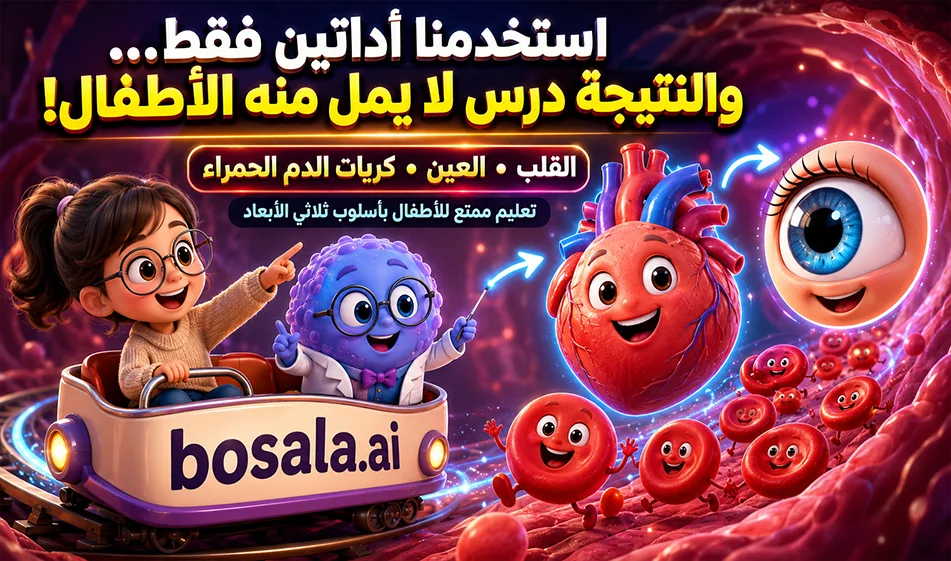
ChatGPT andMindVideo: An Easy Way to Create Educational Videos for Kids Using3D Animation
Video creation website link: https://www.mindvideo.ai/invitation-landing?utm_source=invitation&invite_code=1BCHJ2HX
You can create fun educational videos for kids about the human body by combining two tools: ChatGPT to write the idea, script, and prompts, andMindVideo to turn those prompts into short animated videos.
The idea is simple: We type the video topic into ChatGPT, such as an explanation of the heart, eyes, lungs, or red blood cells, then ask it to turn the topic into a child-friendly script with cute characters and clear educational scenes, and it generates ready-to-use prompts in English for creating the video.
Next, we go toMindVideo , open the Text toVideo tool , paste the prompt, select the free generation tool (which sometimes appears with a cost of 0 credits), choose the appropriate aspect ratio—such as 9:16 for Reels and Shorts or 16:9 for educational videos—set the duration, and click Generate.
This way, you can produce engaging educational scenes in a 3D animation style that helps children understand the human body without getting bored, because the information is transformed into a visual story with movement, colors, and characters that are relatable to children.
Why is this method useful?
Because ChatGPT helps develop the concept and organize the explanation, while MindVideo converts the text into a visual video. This makes creating educational content faster and easier, especially for teachers, content creators, and owners of educational channels.
This method can be used to create videos about the heart, eyes, brain, stomach, lungs, bones, or any part of the human body, and then compile the clips later in editing software to produce a complete educational video.
Free Trial and Credits
MindVideo offersa free trial suitable for beginners. According to the information provided, new users receive approximately 14 free credits, with 2 credits addeddaily upon logging in, meaning there are continuously replenished free credits for the trial.
The Liteplan is the most affordable paid option , priced at around $10 per month, and provides approximately 500 credits with support for1080p output.
Compass Tip
For better results, don’t just write a general prompt. Specify the subject you want to explain, the children’s ages, the video style, the character’s appearance, the educational setting, and the camera movement. The clearer the prompt, the better and easier to understand the result will be.
Example of a brief prompt
Create a 10-second vertical 9:16 family-friendly 3D animated educational video for children about: [enter the subject here].
Use a cute 3D animated girl with short light-brown wavy bob hair, big blue eyes, round glasses, a beige sweater, riding in a small open beige and blue cart labeled only “bosala.ai”. Beside her is a cute blue-purple smart cell teacher with glasses and a tiny lab coat.
The smart cell explains [insert organ name here] to the girl in clear spoken Modern Standard Arabic only. No subtitles, no captions, and no on-screen text except “bosala.ai” on the cart. Dialogue must be very short, child-friendly, and easy to understand.
Show the organ in a clean, simplified, colorful, child-safe 3D educational style. Use glowing arrows, moving particles, simple visual symbols, and animated movement to explain what the organ does.
Camera:
Use varied cinematic shots: wide inside-body reveal, tracking shot beside the cart, macro close-up of the organ, side cross-section or top-down educational view, FPV movement following the organ’s function, and final wide reveal.
Visual style:
Premium Pixar-inspired 3D family animation, colorful inside-body world, soft cinematic lighting, playful perspective, no gore, no scary realism, no medical horror.
Sound:
Arabic voice dialogue only, plus soft educational sound effects, cute organ-related sounds, whooshes, sparkles, and gentle body ambience. No music.
Summary
The integration of ChatGPT andMindVideo gives you an easy way to create educational videos for children about the human body in a fun and engaging style. ChatGPT writes the concept, script, and prompts, andMindVideo turns them into ready-to-use animated scenes, with the option to start with a free trial and daily renewable credits.