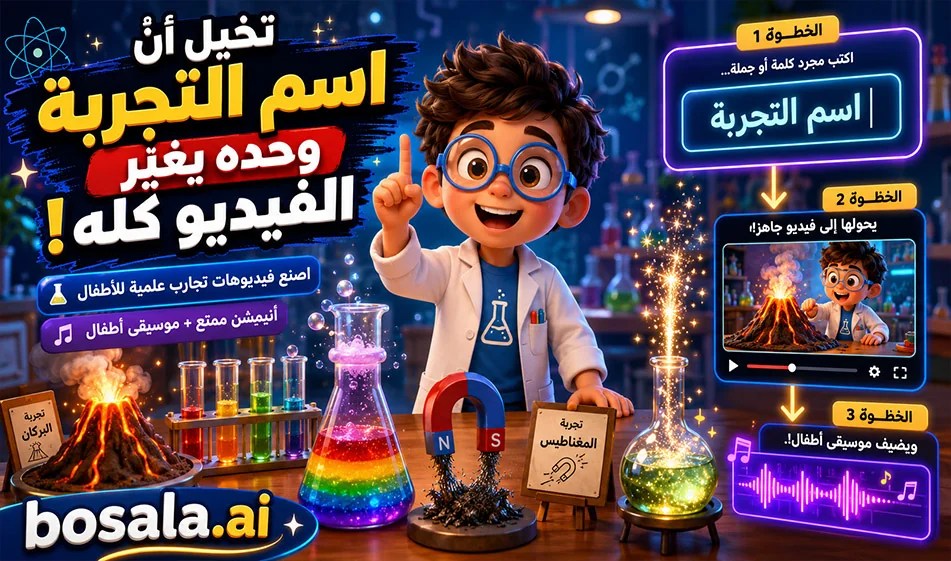
Integrating GeminiGen andMakeSong to Create Science Experiment Videos for Kids
With GeminiGen and MakeSong , you caneasily and repeatedly create educational animated videos for children. Enter the prompt into the video tool, change only the name of the science experiment, then generate and download the video. Next,go toMakeSong, write a simple description of the music, and you’ll get cheerful children’s music that fits the scene. Finally, combine the video and audio in an editing program like CapCut.
Overview
This method is ideal for creating a consistent educational series, since you don’t have to start from scratch every time. You have a single fixed prompt, a fixed character, and a fixed lab; you only change the name of the experiment. After the video, you add cheerful music from MakeSong to make the scene more appealing to children.
Links
Video: https://geminigen.ai/app/video-gen/veo
Additional video site: https://www.mindvideo.ai/invitation-landing?utm_source=invitation&invite_code=1BCHJ2HX
Music website: https://www.makesong.com/
How does it work?
Start inGeminiGen and paste the prompt as is. Then go to the first line and replace the text in parentheses with the name of the science experiment. Click "Generate" and download the resulting video.
Next, go toMakeSong and write a short description of the music you want, such as “fun, lighthearted, and curious children’s music.” Then generate the music and download it. Finally, import the video and music into an editing program.
Why is this method useful?
Because it saves time and makes the process easy to repeat. You can use the same template every time with different experiments, such as volcanoes, electricity, rainbows, or others. This makes it very suitable for educational content for children.
Example of a music description
You can write a description such as:
Cheerful children’s background music, playful, educational, bright, light percussion, soft xylophone, fun science mood, magical and curious atmosphere
Or in Arabic:
Cheerful and educational children’s music, light, joyful, full of curiosity and discovery, suitable for a short science experiment video
Prompt used
Experiment topic: [Write the name of the experiment here]
Create an 8-second children’s educational video in a high-quality 3D animated family-friendly style, inspired by premium cinematic kids’ animation.
The video takes place inside a bright, colorful school science lab.
Main character:
A cute recurring child scientist named Leo, around 9 years old, wearing a small white lab coat, round glasses, and colorful sneakers. Leo is expressive, smart, warm, playful, and highly engaging for children.
Core instruction:
Use the experiment topic written only at the top of this prompt. Understand it correctly, analyze the science concept, and automatically create the best child-friendly visual experiment for it. Choose the correct props, tools, reactions, movement, colors, and simple explanation based on the experiment topic.
Scene setup:
Inside a cheerful school science lab with colorful shelves, beakers, safe school science tools, and soft warm lighting. Leo stands beside a science table where the experiment is prepared. The environment should feel fun, educational, safe, and magical for kids.
Video structure:
0:00 - 0:02
Leo smiles, points to the experiment setup, and introduces it with excitement. The camera gently pushes in.
0:02 - 0:05
The main science action happens clearly and visually according to the experiment topic. Add bright child-friendly effects, simple motion, expressive reactions, glowing science elements, and strong visual clarity.
0:05 - 0:08
Leo explains the result in one very simple Arabic sentence and reacts with joy, curiosity, or amazement. End on a strong hero shot showing Leo and the final experiment result clearly.
Arabic dialogue:
Generate simple spoken Arabic dialogue automatically based on the experiment topic written at the top. The dialogue must be short, clear, educational, and suitable for children aged 6 to 11. Leo should explain the science idea in a very easy and exciting way.
Audio:
No music.
Use only suitable sound effects that match the experiment, such as bubbling, soft eruption, energy hum, water sounds, crackling, spinning, fizzing, air whoosh, light sparkle, or gentle lab ambience, depending on the experiment topic.
Important constraints:
No subtitles.
No captions.
No on-screen text.
No watermark.
No logo.
No dangerous real-life instructions.
Keep the same Leo character, same lab environment, same lighting, same 3D cartoon style, and same educational tone across the whole series.
Make the animation safe, playful, cinematic, colorful, and highly engaging for children.
Duration exactly 8 seconds.
Summary
This integration between GeminiGen andMakeSong is ideal for creating science experiment videos for children quickly and easily. You simply type in the name of the experiment, generate the video, add appropriate music, and then put everything together in the editor. The result is a fun, consistent, and easily replicable educational series.