️ 🖼Tool Name:
Gimkit
🔖 Tool Category:
• Education and Research
• Educational and Fun Games
• Question banks and test generation
• Teacher tools, test evaluation, and quality assurance
• Study Aids and Smart Notes
• Feedback and analytics
️ ✏What does this tool offer?
Gimkit allows teachers and users to create sets of questions called Kits, which include multiple-choice or text-based questions, with the ability to add images, equations, or additional content within the question. After creating a Kit, the game can be launched directly in the classroom or online using a Game Code, where students begin answering the questions. Each correct answer awards in-game points or coins that can be used to purchase upgrades or features to help boost scores, turning learning into a fun, game-like experience.
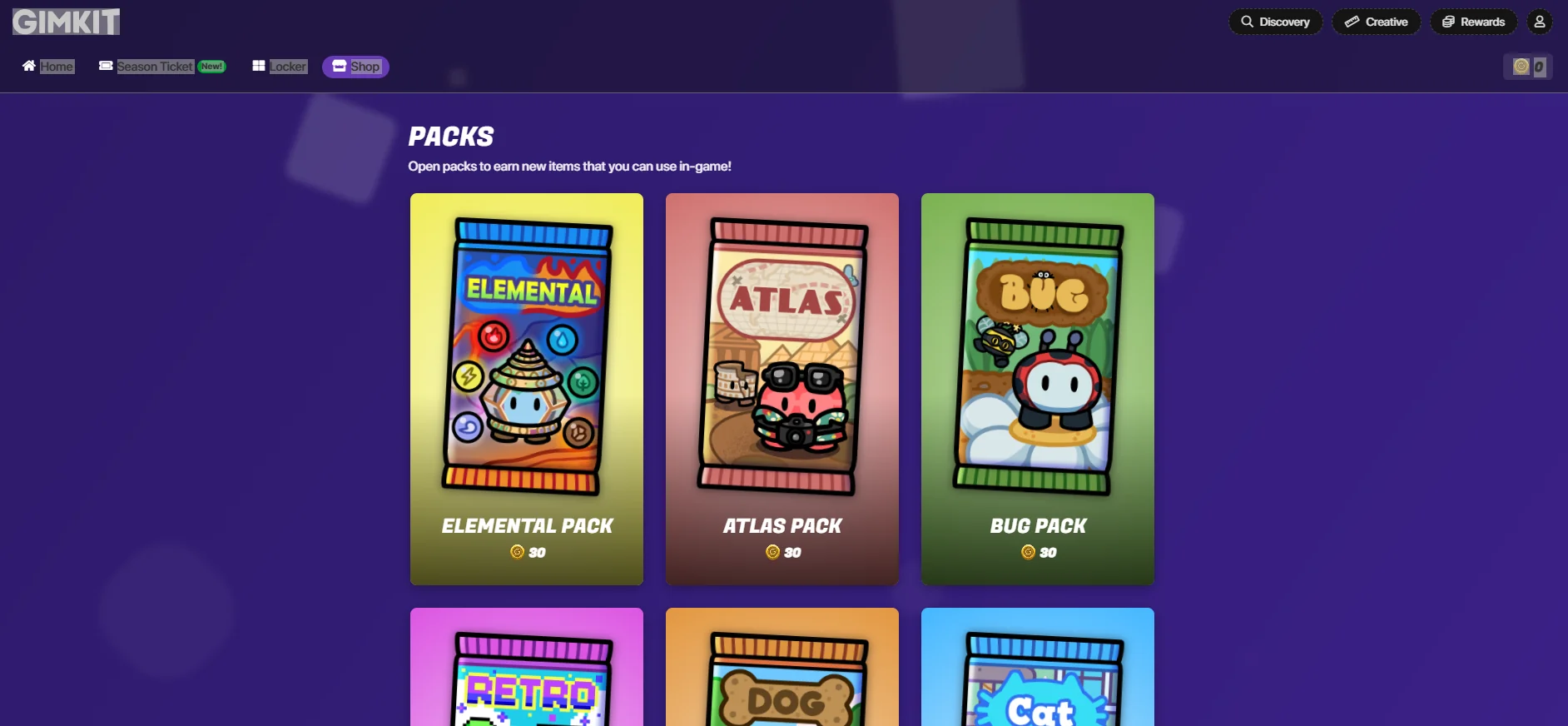
The platform also offers a Discovery section for accessing ready-made quizzes, as well as a Creative section for building custom maps or game modes. Gimkit also features an in-app store that includes:
Packs: Packs such as the Elemental Pack, Atlas Pack, Bug Pack, Retro Pack, Dog Pack, and Cat Pack. When purchasing any pack using in-game currency, the player receives a new character called a Gim that represents them during gameplay.
Items: Special items and skins such as hats, tools, or character-specific items like the Pencil Pack, Electric Guitar, and Graduate, to enhance fun and motivation during gameplay.
The platform also provides reports and statistics for teachers to track students’ performance and answer accuracy, making it easier to assess their understanding of the lesson.
⭐ What does it actually offer based on user experience?
The hands-on Gimkit experience makes learning more interactive and exciting, as students compete to earn points and coins and use them to unlock characters and in-game items. The reward system and in-game store increase students’ motivation to participate and answer questions accurately, while the statistics dashboard helps teachers track students’ levels and continuously assess their progress.
🤖 Does it include automation?
Yes, the platform includes automation features such as:
Automatically calculating points and coins after every correct answer.
Updating results and displaying student progress in real-time during gameplay.
Tracking student performance and generating ready-to-use reports for the teacher after the game ends.
💰 Pricing Model:
Gimkit uses a Freemium model with a basic free plan and individual and institutional paid plans that offer advanced features, detailed statistics, and additional game modes.
🆓 Free Plan Details:
Gimkit Basic – Price: $0 (Always free)
Create games (Kits) and host live sessions with students.
Access to a limited number of free game modes (“Featured Modes”).
No limit on the number of students participating in a session.
Note: Full access to all Pro modes is only available through a paid subscription.
💳 Paid plan details:
Gimkit Pro – Monthly Subscription
Price: $14.99 per month.
Unlock all advanced game modes (Pro Exclusive Modes).
Add images and audio to questions.
Create assignments for students to play outside of live sessions.
Access detailed analytics and reports.
Billed automatically every month.
Gimkit Pro – Annual Subscription
Price: $59.88 per year.
Same benefits as the monthly subscription, with greater cost savings compared to the monthly subscription if used for more than 4 months.
Gimkit Groups Plans (for schools and educational groups)
Department Plan: $650 per year, up to 20 teachers.
School Plan: $1,000 per year, covering all teachers at the school.
These plans provide Gimkit Pro for all teachers with a single centralized administration.
📌 Additional Official Notes:
The Assignments feature is exclusive to Pro subscribers and allows students to play outside of live sessions according to specific schedules.
All content you create, such as Kits and Assignments, remains with you when you upgrade or revert to the free plan.
Free plans offer a limited number of game modes, while the Pro plan unlocks all modes permanently.
🧭 How to access the tool:
You can access Gimkit through your browser by creating a new account as a teacher or student, then creating Kits, choosing a game mode, and sharing the game code with students to start playing, or using the in-game store to purchase Packs and Items with in-game currency.
🔗 Demo link or official website:
https://www.gimkit.com/rewards/shop