ProofHub
Description
️ Tool Name: 🖼
ProofHub
Tool Category: 🔖
- Business and Operations Management
- Tasks and Projects
- Calendars and Scheduling
️ What does this tool offer? ✏
ProofHub provides a comprehensive platform for project management, task organization, team communication, file storage, and time and performance tracking. It allows users to create new projects, break down tasks within each project, and track them using multiple views such as Board view (similar to Trello), Table view for organized scheduling, and Gantt chart for timeline tracking. It also offers collaboration tools such as Chat for instant messaging, Discussions for structured conversations, Announcements for sending general updates, and Proofing for file review, as well as Notes for storing notes. You can customize team permissions using Custom roles and create ready-made projects via Project templates to save time. It also supports integration with external tools via Integrations, and provides support through the Help Center and Contact.
What does it actually offer based on user experience? ⭐
ProofHub helps teams work from a single place, reducing distractions, saving time, and increasing productivity, as evidenced by Capterra’s review, which gives the tool a 4.6/5-star rating. The tool enables project management for all types of teams, including marketing, technical, educational, and creative teams, with the ability to track deadlines and milestones using Calendar and track work hours via Time, ensuring complete transparency for every step within the team.
Does it include automation? 🤖
The tool includes features that help organize workflows and manage tasks seamlessly, but its official documentation does not mention advanced automation such as setting up automatic rules or smart bots.
Pricing Model: 💰
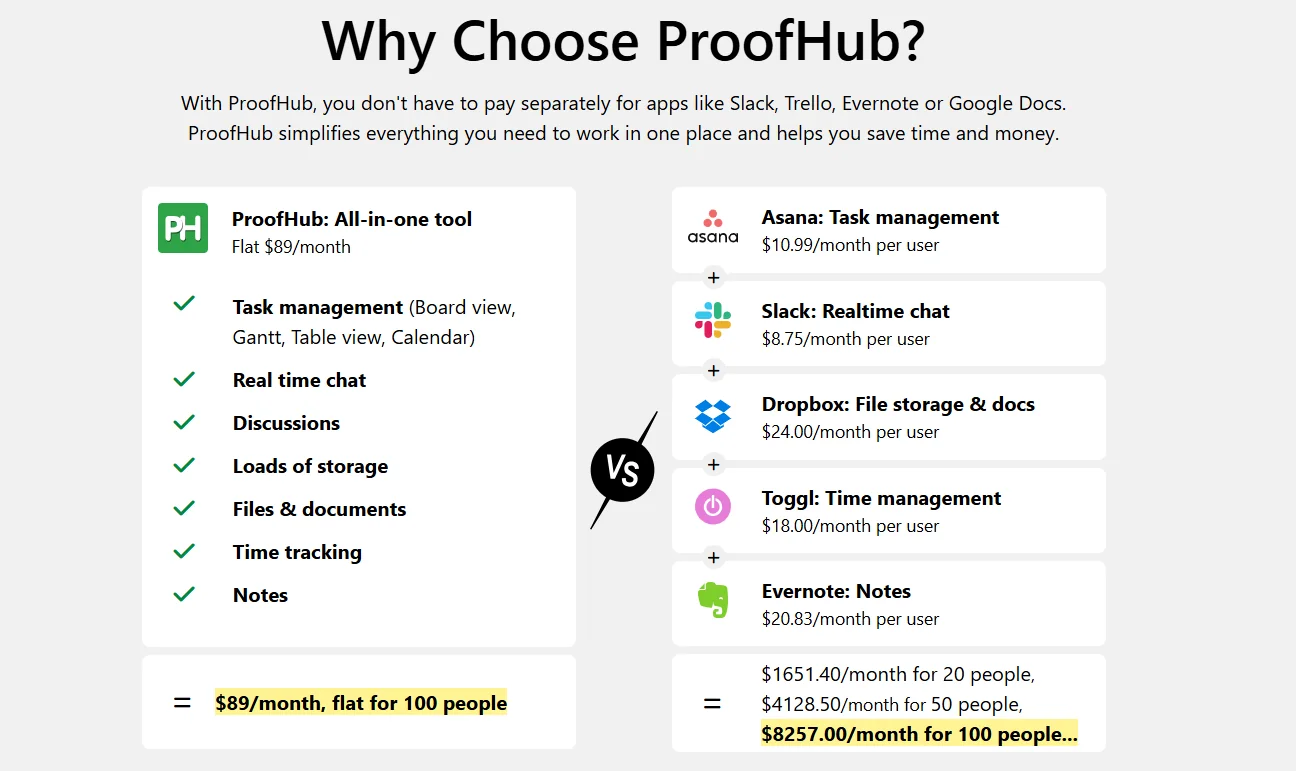
Flat pricing, meaning a fixed fee regardless of the number of users, with the ability to cancel at any time, without long-term contracts.
🆓 Free Plan Details:
There is no specific free plan with full features, but you can start a free trial by clicking the “Start your free trial” button to create an account and test all the tool’s features before subscribing.
Paid Plan Details: 💳
- ULTIMATE CONTROL: $89 per month when billed annually or $99 per month when billed monthly. Includes: Unlimited projects, unlimited users, 100GB of storage. Note: Limited-time OFFER $150 → $89 Save 10% + 34%.
- ESSENTIAL: $45 per month when billed annually or $50 per month when billed monthly. Includes: 40 projects, unlimited users, 15GB storage.
This pricing model offers significant cost savings compared to other tools like Asana, Slack, Dropbox, Toggl, and Evernote, as a team of 100 people can pay $89 per month for ProofHub versus a cost of up to $8,257 per month when using other tools with a per-user fee structure.
How to access the tool: 🧭
The tool can be accessed directly via a browser; create a new account to experience all features.
Trial link or official website: 🔗
https://www.proofhub.com/pricing