️ Tool Name: 🖼
TeamPulse
Tool Category: 🔖
- Analytics and Dashboards
- Data and Analytics
- Business and Operations Management
️ What does this tool offer? ✏
TeamPulse offers a comprehensive platform for analyzing team performance through data, with a focus on improving productivity and team well-being. The tool enables real-time monitoring of team performance via GitHub and Slack, and provides actionable recommendations. Key features include: pull request tracking, PR statistics, review heatmaps, team satisfaction metrics, and quick polls via Slack, as well as personalized dashboards to view individual performance versus team performance. The tool also provides tools to identify top contributors using Leaderboards, analyze workflow bottlenecks, and offers seamless integration with GitHub and Slack workflows.
What does it actually offer based on user experience? ⭐
The tool enables teams to gain a clear and comprehensive view of each team member’s performance and periodically assess the team’s overall health, helping them make data-driven decisions to improve productivity and collaboration while reducing internal issues. Custom dashboards and recommendations enable fast and effective analysis and decision-making, while also helping to identify hidden issues such as burnout or poor communication among team members.
Does it include automation? 🤖
The tool offers partial automation in collecting and analyzing data from GitHub and Slack, as well as automatically generating dashboards and displaying insights, but it does not include advanced automation for automatically creating tasks or responses beyond the scope of analysis and recommendations.
Pricing Model: 💰
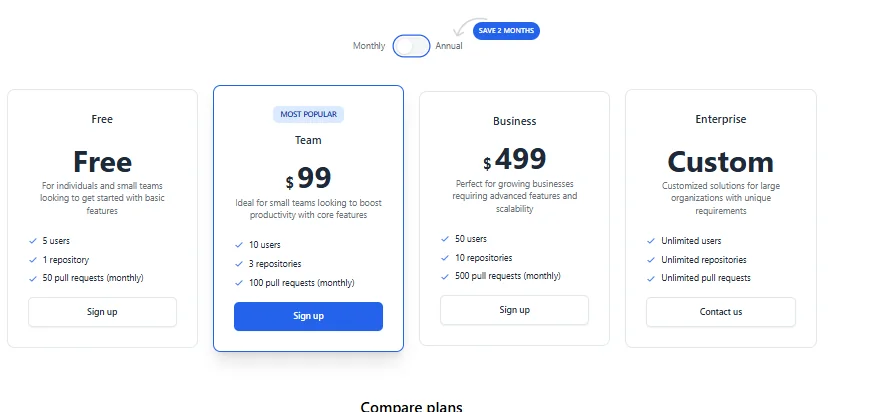
TeamPulse offers various plans based on team size and needs, with the option to switch between monthly or annual payments to receive a discount. Pricing is flexible based on the number of users, repositories, and pull requests.
🆓 Free Plan Details:
- Free: Up to 5 users, 1 repository, and 50 pull requests per month.
Paid Plan Details: 💳
- Team: $99 per month, up to 10 users, 3 repositories, and 100 pull requests per month. This is the most popular plan.
- Business: $499 per month, up to 50 users, 10 repositories, 500 pull requests per month.
- Enterprise: Custom, includes unlimited users, repositories, and pull requests; pricing is determined by contacting the sales team.
- Annual pricing: Team $990/year, Business $4,990/year, with a "Save 2 months" option when paying annually.
- Plan comparisons include Data Access Period (7 days, 30 days, 90 days) and Team Insights tools such as PR Statistics, Review Heatmap, and Top 3 Leaderboards.
How to access the tool: 🧭
You can access TeamPulse via your browser and create a new account using the "Get Started" button, or log in via "Sign In." After logging in, the tool connects to GitHub and Slack to enable performance analysis and track team health.
Demo link or official website: 🔗
https://www.teampulse.io