Description

️ Tool Name: 🖼
SpriteLab

Categories: 🔖

  • Game Asset Generation
  • Image Design and Creation
  • Batch and Style Conversion
  • Entertainment and Games

️ What does this tool offer? ✏
SpriteLab is an AI-powered platform for creating pixel art -style game assets designed for independent game developers, helping them quickly produce characters, elements, environments, backgrounds, and ready-to-use graphics for use within game engines.

The platform allows you to create assets in several ways, including:

  • Converting text into game characters and elements (Text to Sprite).
  • Converting images to pixel art.
  • Redesigning elements in various styles.
  • Creating movements and animations.
  • Generating pixel art backgrounds.
  • Creating tilesets that can be used in games.
  • Create multiple copies of the same element while preserving the basic shape.

SpriteLab provides a built-in pixel editor that allows you to manually adjust details, with the ability to:

  • Change colors.
  • Adjust the size.
  • Adjust contrast.
  • Make visual enhancements without using additional credits.

The platform also supports creating bundles of up to 64 sprites in a single operation, which helps speed up the creation of game worlds.

SpriteLab produces assets suitable for use in engines such as Godot and Tiled, with the ability to export files in the following formats:

  • PNG.
  • SVG.

The platform’s capabilities include:

  • Creating characters, weapons, items, and game environments.
  • Creating walk, attack, and spin animations from a single sprite.
  • Creating small elements in Micro mode with sizes ranging from 16 to 64 pixels.
  • Creating pixel art backgrounds with resolutions up to 8K.
  • Creating tilesets for game maps.
  • Use the Reskin feature to produce new shapes and materials for the same element while preserving the silhouette.

The platform uses a credit system for creating assets, with the cost varying depending on the type of operation:

  • Creating a sprite using the Epic template: 1 credit.
  • Create a sprite using the Mythic template: 6 credits.
  • Smart Transform: 6 credits.
  • Converting an image to pixel art: 3 credits.
  • Creating an animation: 20 credits.

What does it actually offer based on user experience? ⭐

  • Quickly create pixel art game assets without having to draw every element by hand.
  • Produce characters, backgrounds, and elements that are ready to use in game projects.
  • Create multiple versions of the same design while maintaining visual consistency.
  • Provide a built-in editor to modify assets after they’ve been created.
  • Export files in formats compatible with game engines.
  • Create animations from static elements.
  • Streamline the game world design process for independent developers.

Does it include automation? 🤖
Yes, SpriteLab relies on AI-powered automation to create and edit game assets.

Automation includes:

  • Generating characters and elements from text descriptions.
  • Automatically converting images to pixel art.
  • Creating backgrounds and environments.
  • Creating movements and animations from a single sprite.
  • Redesigning elements and creating new versions.
  • Create tilesets that can be used in games.

Pricing model: 💰
Freemium (free plan + paid plans with monthly or annual subscriptions).

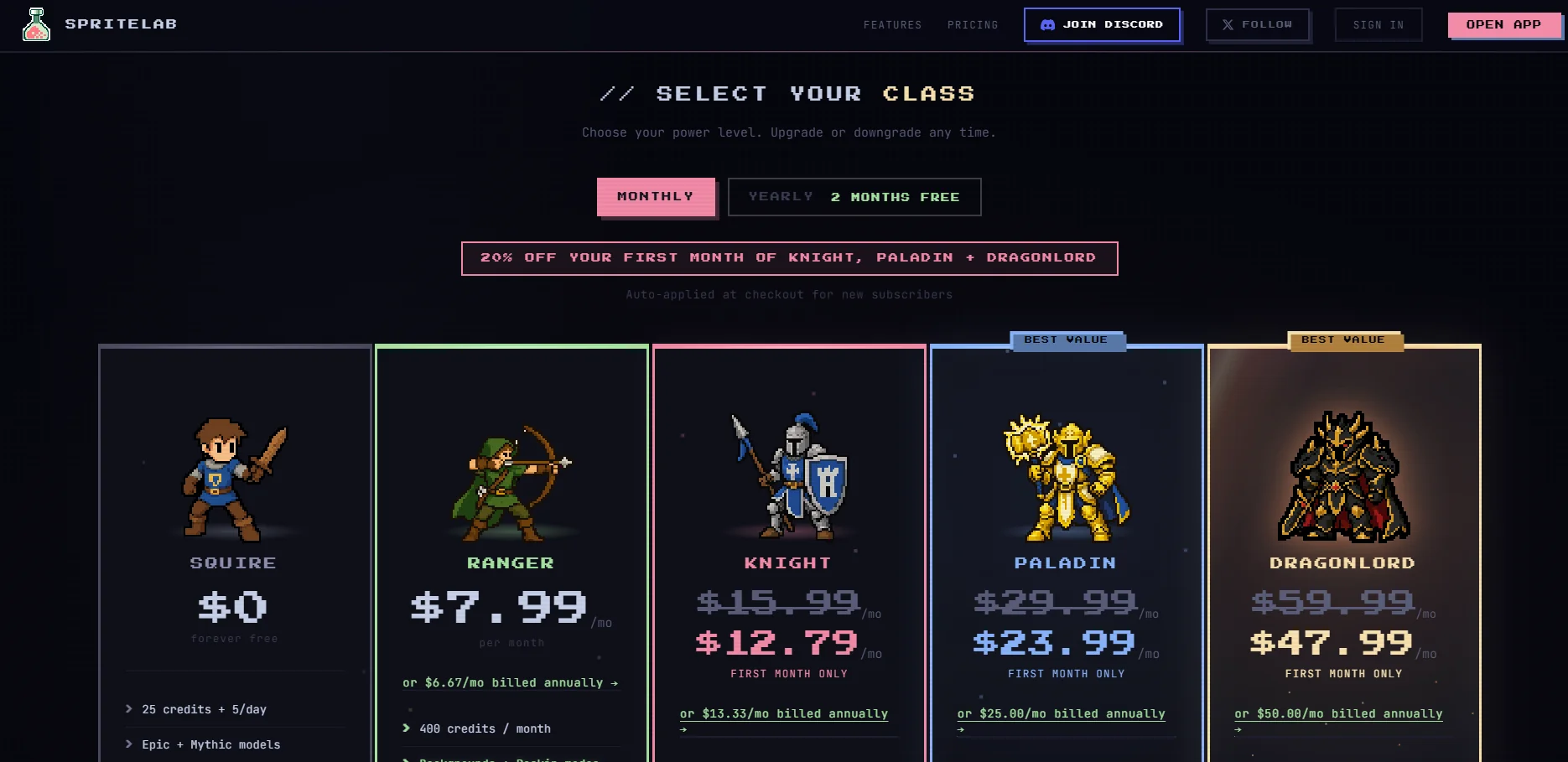
SpriteLab offers a permanent free plan, as well as paid subscriptions that provide more credits and advanced features such as backgrounds, reskinning, and cloud storage.

🆓 Free Plan Details:

FeatureDetails
PlanSquire
PriceFree
Starting Credits25 credits
Daily Credits5 credits per day
Available ModesEpic and Mythic
Pixel EditorAvailable
File exportPNG and SVG
Commercial LicenseAvailable for use in projects and games

Paid plan details: 💳

PlanPriceBenefits
Ranger$7.99 per month or $6.67 per month when billed annually400 credits per month, background creation, Reskin feature, save 20 designs to the cloud, create up to 4 different versions of a design
Knight$15.99 per month or $13.33 per month when paying annually1,000 credits per month, all Ranger features, save 35 designs to the cloud
Paladin$29.99 per month or $25 per month when billed annually2,500 credits per month, all Knight benefits, save 200 designs to the cloud, best value for your credits
Dragonlord$59.99 per month or $50 per month when paying annually5,000 credits per month, unlimited cloud storage, early access to new features

How to access the tool: 🧭

MethodDetails
WebAvailable via the SpriteLab platform
File exportPNG and SVG
Game EnginesSupport for assets compatible with engines such as Godot and Tiled
StorageSave designs to the cloud based on your plan

Demo link or official website: 🔗
https://spritelab.ai/

Pricing Details

The pricing model on the SpriteLab platform is based on a freemium system, offering a permanent free plan alongside monthly or annual paid subscriptions that give users a larger number of credits, as well as advanced features such as background creation, asset reskinning (reskinning), and cloud storage. The free Squire plan gives users 25 credits to start with and 5 credits per day, with the ability to use Epic and Mythic templates, access the Pixel Editor, and export files in PNG and SVG formats, along with a commercial license to use the assets in projects and games. Paid plans start at $7.99 per month for the Ranger plan, which provides 400 credits per month along with background creation, reskinning, and the ability to save 20 designs to the cloud. The Knight plan, priced at $15.99 per month or $13.33 per month when paid annually, offers 1,000 credits per month along with the Ranger plan’s benefits and increased storage capacity. The Paladin plan, priced at $29.99 per month or $25 per month when paid annually, offers 2,500 credits per month and the ability to save up to 200 designs, making it the best option in terms of credit value. The top-tier Dragonlord plan, priced at $59.99 per month or $50 per month when paid annually, provides 5,000 credits per month with unlimited cloud storage and early access to new features.