Description
️ Tool Name: 🖼
Everest
Categories: 🔖
Smart Calendars & Personal Assistants, Productivity & Scheduling, Automation & Smart Agents, Tasks & Projects, Business & Operations Management, Integrations & APIs
️ What does this tool offer? ✏
Everest provides a smart assistant for calendars and meeting scheduling. It syncs connected calendars and manages the entire meeting scheduling process—from suggesting suitable times and negotiating via email to booking the appointment in the correct calendar. You can connect Google and Microsoft/Outlook calendars, then add Everest’s email address to an email thread so it can suggest times, handle the back-and-forth correspondence, and book the meeting. It can also reschedule and follow up if no response is received.
The platform provides a unified calendar that combines personal, work, and client calendars into a single interface, with the ability to switch between day, week, month, and year views, as well as a grid view. Everest checks availability across all calendars to avoid conflicts and double bookings, and you can create or move a meeting to the appropriate calendar directly from the unified view.
To maintain the privacy of meeting details, Everest reflects commitments from one calendar to another as private time blocks labeled “Busy” without transferring the meeting title or details to other calendars. It also saves information about the people you schedule meetings with—such as names, email addresses, and time zones—so it can identify frequent contacts and suggest suitable times based on their time zones.
Everest can also be used via text chat to issue direct requests, such as booking a time slot with a specific person and then sending them an invitation. It can also double-check availability before booking and handle meetings with multiple participants by suggesting a time that works for everyone and booking it upon confirmation.
Everest is specifically designed for people who manage multiple calendars, business relationships, and overlapping commitments—such as freelancers, consultants, agency owners, and those who work with multiple clients—and can also be used to separate personal and professional calendars.
In terms of privacy, Everest does not access your entire inbox; it only processes email threads that you manually add to it. The privacy policy states that Google data is not used to train, fine-tune, or evaluate general AI models, and the company does not sell personal data or use it for targeted advertising.
What does it actually offer based on user experience? ⭐
The official page does not display enough independent reviews to provide an unbiased assessment of the user experience, so no independent evaluation can be attributed to users. However, the website demonstrates the assistant’s actual workflow: the user adds Everest to the email thread, after which it suggests times, handles negotiations, books the meeting, and reschedules or follows up with the other party as needed.
The interface also shows the status of scheduling processes, such as waiting for a response, suggested times, follow-ups, booking, and resuggesting new times when conflicts arise.
Does it include automation? 🤖
Yes. Everest relies on AI-powered automation to manage the entire meeting scheduling cycle—from reading the email thread it was added to and suggesting times, through negotiation and booking, all the way to rescheduling and follow-ups. It can also carry out requests directly via text chat.
Everest uses language model providers to process messages and scheduling context; its privacy policy states that OpenAI is currently the primary provider, with Fireworks AI and Anthropic serving as automatic fallbacks when the primary provider is unavailable.
Pricing Model: 💰
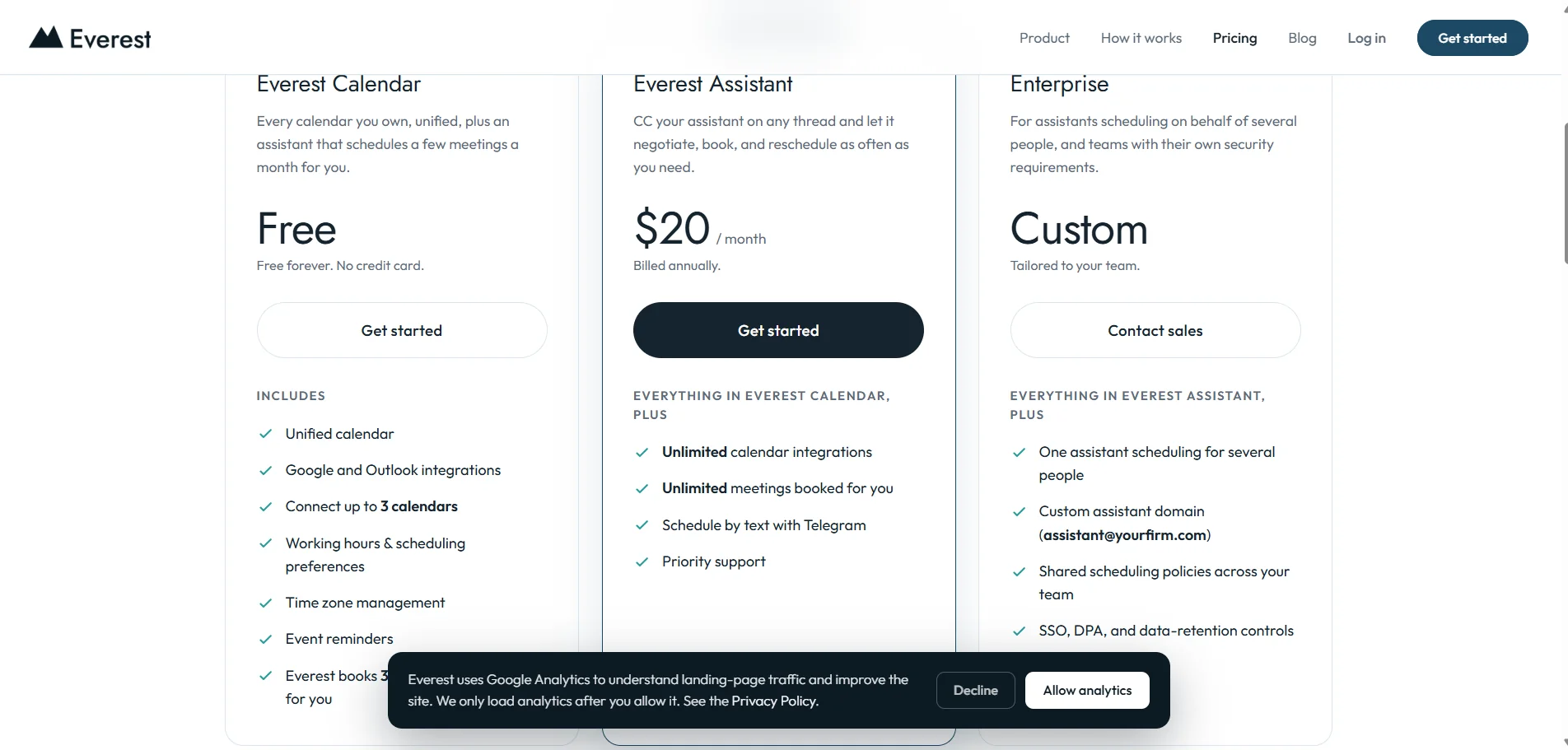
Freemium, with a free-forever plan, a paid Smart Assistant plan, and a custom Enterprise plan. Monthly and annual billing are available; annual billing for the Everest Assistant plan offers a rate of $20 per month instead of $25 per month, representing a 20% savings. The free plan does not require a credit card.
🆓 Free Plan Details:
| Feature | Details |
|---|---|
| Plan Name | Everest Calendar |
| Price | Free Forever |
| Credit Card | Not required |
| Unified Calendar | Included |
| Calendar Integrations | Google and Outlook |
| Number of Calendars | Up to 3 calendars |
| Business Hours and Scheduling Preferences | Included |
| Time zone management | Included |
| Event reminders | Included |
| Meetings Scheduled by Everest | 3 meetings per month |
Everest clarifies that a single email thread counts as one meeting, regardless of how long negotiations take or whether the meeting is rescheduled before the date is finalized. Once you reach the 3-meeting limit, Everest will complete the conversation that’s already started; then you can upgrade or wait until the limit resets the following month.
Paid Plan Details: 💳
| Plan | Price | Details |
|---|---|---|
| Everest Assistant | $25 per month when billed monthly / $20 per month when billed annually | All the features of Everest Calendar, plus unlimited calendar integrations, unlimited meetings booked by the assistant, scheduling via text messages using Telegram, and priority support |
| Enterprise | Custom pricing | All the features of Everest Assistant, plus one assistant to schedule on behalf of multiple people, a custom domain for the assistant (e.g., assistant@yourfirm.com), shared team scheduling policies, SSO, DPA, and data retention controls, and dedicated support |
The pricing page explains that the annual payment for the Everest Assistant plan is $20 per month instead of $25 per month—a 20% savings—with the option to switch between monthly and annual billing.
How to access the tool: 🧭
| Access | Details |
|---|---|
| Web | Available via the Everest platform |
| Google Calendar | Direct Integration |
| Microsoft / Outlook | Seamless integration |
| Add Everest to the email thread via CC | |
| Text Chat | Available for direct scheduling requests |
| Telegram | Scheduling via text messages within Everest Assistant |
| Unified Calendar | View and manage all connected calendars from a single interface |
Everest requires calendar permissions to read events, check availability, and create or edit events, but it does not request access to your inbox to read emails in general.
Demo link or official website: 🔗