💡 Compass Tip
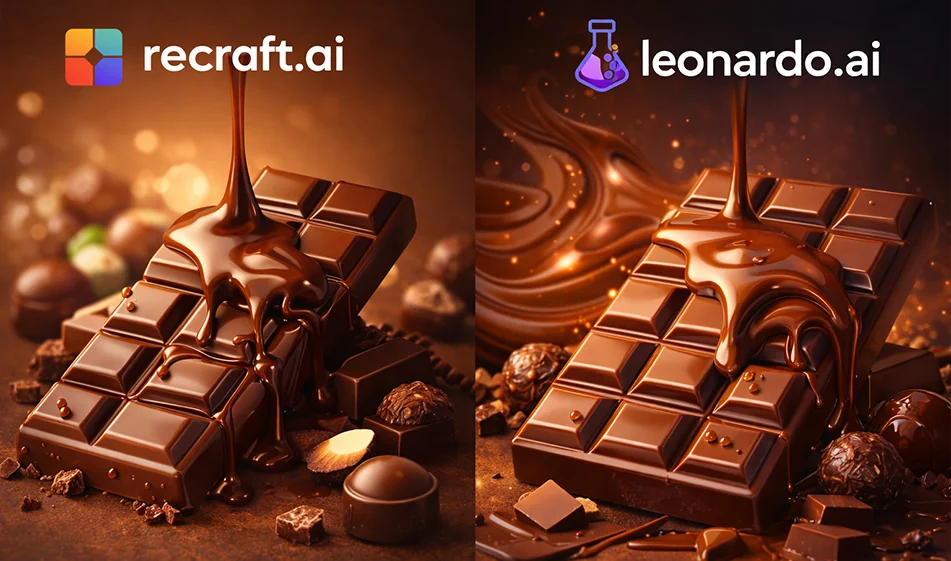
If your goal is to produce a chocolate ad image that looks "campaign-ready" in a short time, the key is not the best tool overall, but the one that best serves the type of ad you want: Photorealistic? Or a clean ad design with clear elements, graphics and identity?
✅ Practical difference between the two tools
1) Recraft.ai (usually suited for clean advertising design)
- Powerful when you want an uncluttered ad style: Simple backgrounds, clean shapes, design elements, and multiple copies quickly.
- Suitable if you need a poster/banner-like output with a clear text area, and a touch more "design" than "photography".
- Excellent choice for producing auxiliary elements: Icons, decorations, shapes, backgrounds, or semi-Vector styles that support the brand's identity.
When to choose it?
If your ad relies on a "clean visual identity" and clear design components, rather than a very realistic photo shoot.
2) Leonardo.ai (usually suited for realistic and cinematic product shots)
- Strong when you want an ad image that looks like product photography: Chocolate shine, light reflection, textures, details of pieces and crumbs.
- Suitable for producing cinematic scenes: Melting chocolate, flying pieces, light vapor, deep background, studio lighting.
- Useful if your focus is more on the "shot" itself than a poster design.
When to choose it?
If your ad relies on high realism and a premium look and feel inproduct photography.
🧪 Quick test to choose the best one (10 minutes)
Apply the same idea to both tools and then compare with these criteria:
- The realism of the chocolate texture (shine + melt + detail)
- Cleanliness of the background and space to add a price/display
- Consistency of the product's appearance across multiple versions
- Attractiveness of the ad at first sight (contrast, lighting, composition)
- How easy it is to get 5 different versions quickly
🧩 Prompt ready for a chocolate ad (copy and edit brackets)
"Luxury Product Photography" version (more suitable for Leonardo usually):
"Chocolate product ad image (product name), professional studio product photography, softboxlighting,luxurious dark background with simple gradient, chocolate bar in the center with small pieces around it, realistic texture and natural shine, high detail, realistic shadows, simple depth of field, close-up, clean commercial style, blank space at the top for text"
"Clean Poster" version (usually more suitable for ReCraft):
"Poster for a chocolate product (product name), clean and modern design, simple gradient background, drawn chocolate elements/semi-Victorian or design style, neat composition with clear text space, soft lighting, fancy colors, commercial style, social media friendly version"
⭐ A brief business plan to produce a ready-made ad
- Produce 3 copies in each tool with the same prompter.
- Change only one thing in each version: (background/camera angle/close-up).
- Choose the best version of each widget.
- It's the finalized ad:Add a price/offer/logo in a design editor (depending on your style).
- Keep the best prompter and make a series of them for other products.
💰 Pricing Note
Both tools often offer a free trial option (with a limited amount or number of generators), and then paid plans for higher quality and higher quantity of generators.It's best to test the chocolate ad itself on the free plan first, then decide.
🧭 Golden Compass Tip
For chocolate ad images, always ask for: Soft studio lighting + realistic shadows + space for text. A successful ad is not only the most beautiful image, but an image that "sells" because it is clear and leaves room for the message.
For more AI tools: bosala.ai