🧾 Compass Tip: Creating advertising images with artificial intelligence — Genspark vs. Reve comparison
· 2 min read
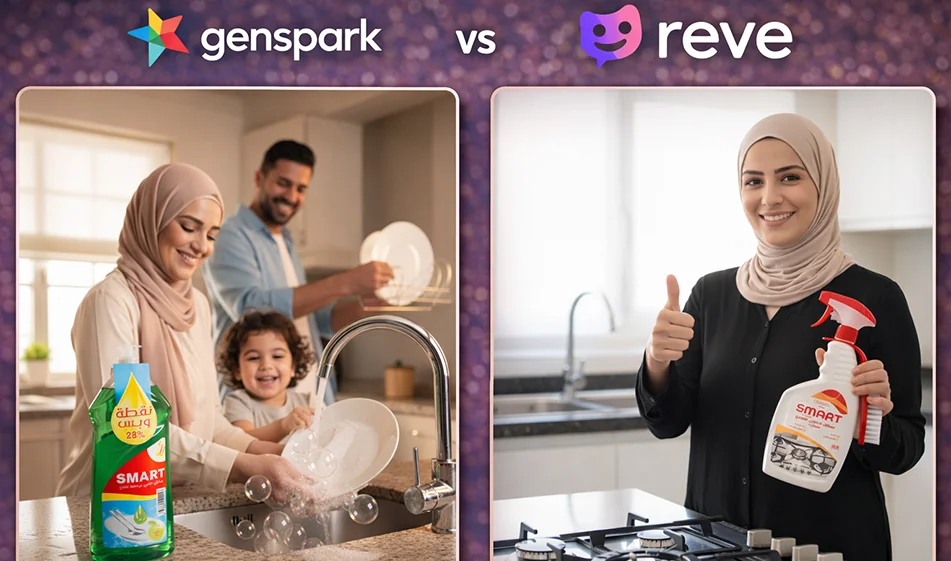
If you want advertising photos for a product quickly (professional backgrounds, studio lighting, multiple angles), the comparison between Genspark and Reve is not "which one is prettier?" but rather:
Which one gives you an ad that is actually usable without distorting the product?
1) Genspark: Excellent for speed and generating multiple versions for testing
When is it right for you?
- When you want a large number of copies quickly (multiple backgrounds for the same product).
- Suitable for creating a campaign image "library": studio, kitchen, store shelf, luxurious background...
- Good for testing several ideas and then choosing the best one for the campaign.
Important point: Always request "keep the shape of the packaging and label" to avoid changing the details.
2) Reve: Excellent for clean images and an advertising touch
When is it right for you?
- When you want a clear "advertisement look": a neat composition, soft lighting, and a background suitable for adding text.
- Good for posters and banners where you need empty space for text and presentation.
- Suitable if your goal is one "final" image rather than dozens of copies.
Important point: Keep your request simple and clear, and avoid crowding too many elements.
A fair test that determines the best for your product in 10 minutes
- Use the same product image in both tools.
- Use exactly the same prompt.
- Print 4 copies of each tool (light/dark/home/luxury background).
- Choose the best based on:
- The stability of the product shape and label
- Realistic lighting and shadows
- Clean background and space for text
- Suitability of the image as an actual advertisement
🧩 Ready-made ad prompt (copy and edit only the product name)
“Professional advertising image for product (product name) in the foreground, clean studio photography, soft lighting, realistic shadows, high detail, simple background with empty space for text, neat advertising composition, no people, no writing inside the image, preserve the shape of the product and label as is, high quality.”
✅ "Luxury" version (add this line):
"Dark gradient background, soft light halo behind the product, subtle reflection, luxurious feel."
✅ "Home" version (add this line):
"Tidy kitchen or home table background, natural morning lighting, warm feel."
🧭 Compass summary
- If your goal is to quickly test a large number of copies: Genspark willusually serve you well.
- If your goal is a clean final image with an advertising feel: Reve willoften give you a result closer to a ready-made advertisement.
For more AI tools: bosala.ai
About GenSpark AI
- Generates personalized Sparkpages in real time from user queries
- Uses a multi-agent framework with agents specialized in different information aspects
- Aggregates information from multiple sources into focused pages free of ads and commercial bias
- Includes a built-in AI Copilot that answers questions and expands information on demand
- Verifies sources dynamically to keep information neutral
- Lets you edit or check content manually
Related Tips
- How to Use the Pokecut Tool to Easily Extract Images
- A professional prompt for turning a meal name into a full recipe infographic
- Bosala Brand Studio Explains: How to Create a Complete Visual Identity from a Logo in Minutes?
- An Explanation of GeminiGen AI for Creating Videos and Images for Children
- A Comparison of VisualGPT and NoteGPT for Creating Free Images and Designs on GPT Image 2