Description
️ Tool Name: 🖼
Kaiber
Categories: 🔖
Text and Images to Video
Photo Design and Editing
Video, Editing, and Motion Graphics
Audio, Voice, and Music
Music and Effects Generation
Removing and Replacing Elements and Backgrounds
Editing/Enhancement/Resolution Up-scaling
Social media templates and automated editing
️ What does this tool offer? ✏
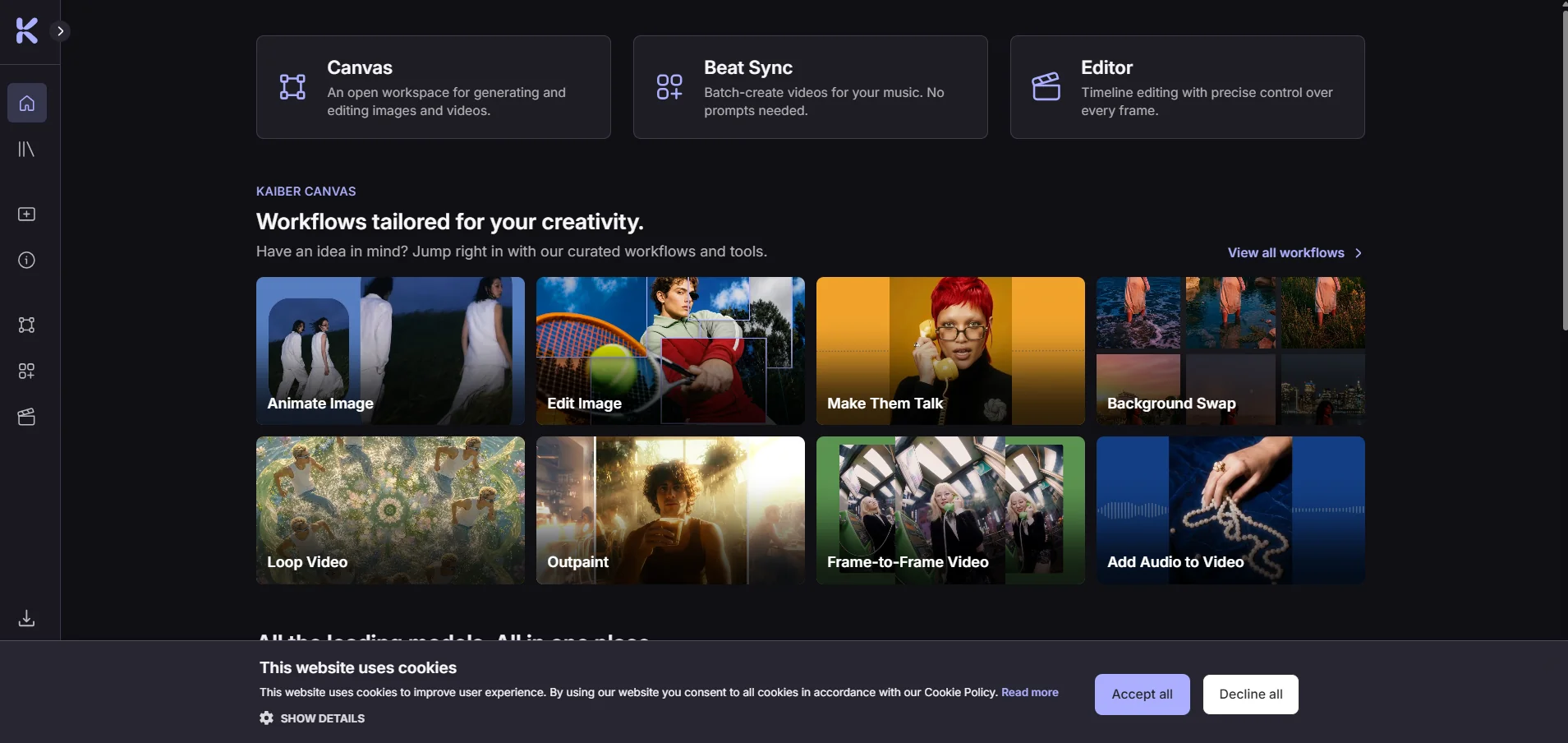
Kaiber is a creative platform that uses artificial intelligence to create videos, images, and audio; sync visual content with music; and edit videos—all within a single workspace. The platform consists of three interconnected tools— Canvas,Beat Sync,and Editor—all accessible from the control panel, along with a media library that stores created or uploaded files.
Canvas allows users to create videos, images, and audio using text commands or reference media, with capabilities to edit, redesign, and animate images; create videos from keyframes; add audio; perform lip-syncing; and enhance the resolution of images and videos. The platform also offers a range of AI models for content creation, including Kling, Wan, Veo, and Nano Banana.
Beat Sync, meanwhile, allows users to create videos synchronized to the beat of music by uploading an audio file and adding images or video clips, without the need to write prompts. It can generate up to 10 videos in a single batch depending on the plan used, in addition to creating media variations, animating images, and using Auto-Clip to convert long videos into clips. You can also add lyrics and captions and export videos in various aspect ratios.
Editor functions as a timeline-based video editor, where you can arrange and trim clips, combine audio, text, and transitions, and then export projects in multiple aspect ratios. You can transfer media between Canvas, Beat Sync, and Editor via the Media Library.
What does it actually offer based on user experience? ⭐
Create videos, images, and audio files using artificial intelligence.
Automatically create videos synchronized to the beat of the music.
Create up to 10 publish-ready videos in a single batch, depending on the plan you’re using.
Animate images and convert them into videos.
Create variations of photos and videos.
Convert long videos into short clips using Auto-Clip.
Add lyrics and captions.
Edit, arrange, and trim videos on the Timeline.
Add text, audio, and transitions to videos.
Create content without having to write a prompt in Beat Sync and some Canvas tracks.
Create content suitable for social media platforms with the ability to export in different aspect ratios.
Save media you create or upload to the Media Library and reuse it across various Kaiber tools.
Does it include automation? 🤖
Yes. Kaiber includes clear automation features, especially in Beat Sync,where images and videos are automatically synced to the beat of the music without the need to write prompts. The tool can also create multiple videos in a single batch, generate variations of media, split long videos into clips using Auto-Clip, and automatically add lyrics and captions.
The control panel also offers more than 20 smart workflows for tasks such as animating and redesigning images, lip-syncing, and creating music videos.
Pricing Model 💰
| Item | Details |
|---|---|
| Pricing Model | Paid / Subscription |
| Trial | 5 days for $5 |
| Credits Trial | 500 Credits |
| The trial includes | Canvas, Editor, and Beat Sync |
| After the trial ends | It will automatically convert to Creator Monthly unless canceled |
| Credit Validity | Unused credits do not expire and roll over from month to month |
| Purchase Additional Credits | Available at any time |
| Generation Cost | Varies depending on the type of content, the template used, and the video length |
🆓 Free Plan Details
| Item | Details |
|---|---|
| Free Plan $0 | Currently not available in the official plan information |
| Alternative | 5-day paid trial |
| Trial Price | $5 |
| Trial Type | Not a free plan |
Plan Details 💳
| Feature | 5-day trial | Starter | Creator | Pro | Visionary |
|---|---|---|---|---|---|
| Monthly Price | — | $10 | $29 | $99 | Custom |
| Price with an annual subscription | — | $8/month | $23/month | $79/month | Custom |
| Credits | 500 | 500 per month | 1,500 per month | 5,000 per month | Unlimited |
| Annual Credits | — | 6,000 | — | — | — |
| Canvas | Available | Standard Models | All features and models | Unlimited | Custom |
| Number of Canvases | — | 1 | 5 | Unlimited | Custom |
| Concurrent Generations | — | 3 | 15 | Unlimited | Custom |
| Editor | Available | Available | Available | Unlimited | Custom |
| Timelines | — | 1 | Unlimited | Unlimited | Custom |
| Beat Sync | Available | Not available | Available | Available | Custom |
| Beat Sync videos in the batch | Up to two videos | — | Up to two videos | Up to 10 videos | Custom |
| Auto-Clipping / Auto-Clip Video | Available | — | Available | Available | Custom |
| Commercial use | — | — | Available | Available | Custom |
| Custom Support | — | — | — | — | Available |
Additional Notes 📝
| Item | Details |
|---|---|
| Trial ends in 5 days | Automatically converts to Creator Monthly if not canceled |
| Unused credits | Carry over from month to month and do not expire |
| Additional credits | Additional Credit packages can be purchased at any time |
| Generation cost | Varies depending on the content type, the template used, and the video length |
| View Generation Cost | The number of credits required appears next to the generate button |
How to access the tool: 🧭
Web: Available through the Kaiber dashboard, from which you can access Canvas, Beat Sync, Editor, and the Media Library.
App/Mobile: According to the official help center, Kaiber can be used on mobile devices.
API: Not mentioned in the official information cited here, so API availability cannot be confirmed.
Demo link or official website: 🔗
Kaiber – Official Website