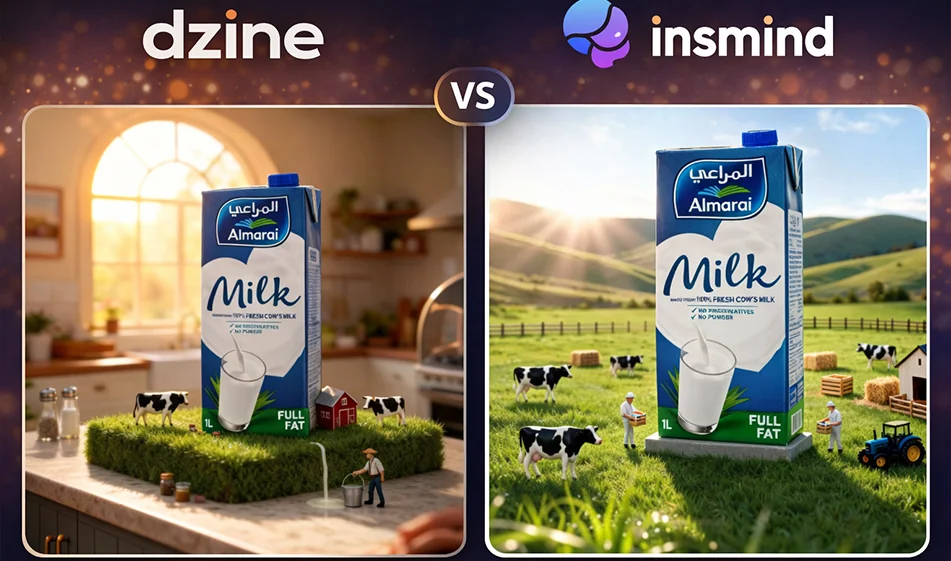
๐Ÿถ Comparison: Dzine vs insMind for creating Almarai milk ad images with artificial intelligence

๐Ÿถ Comparison: Dzine vs insMind for creating Almarai milk ad images with artificial intelligence

: Dzine vs insMind for creating Almarai milk ad images with artificial intelligence

๐Ÿ’ก Compass tip

If your goal is to quickly produce a professional advertisement image for a product such as Almarai milk (attractive background + studio lighting + multiple angles), then the choice of tool depends on the type of work you do: Do you want a platform that focuses on "backgrounds and product advertisements"? Or a quick processing platform (background cropping + enhancement + backgrounds with descriptions) in one place?

1) Dzine: Strongest for ready-made advertising images with product backgrounds

When does it excel?

  • When you have a ready-made product image and want to quickly place it in advertising backgrounds with good control over lighting and colors.
  • Suitable for producing multiple copies (multiple backgrounds and angles) to choose the best for your campaign.
  • Gives strong results in "product photography" with a clean advertising style.

Suitable for: store advertisements, catalog photos, product posters with professional backgrounds.

2) insMind: Stronger for quick preparation before advertising

When does it excel?

  • When you first need to accurately remove the background of a milk carton before anything else.
  • Excellent for cleaning up the image: cropping, enhancing, and quick editing before moving on to the final design.
  • Useful if you want to quickly replace backgrounds without getting into too many details.

Suitable for: Quickly preparing product images, cleaning edges, and replacing backgrounds in simple steps.

The best workflow for the "Almarai Milk" ad (practical and fast)

  1. Get started with insMind
    • Upload a photo of the milk carton
    • Automatically remove the background
    • Make sure the edges are clean, especially around the cap and white edges
  2. Then use Dzine to create multiple ad copies
    • Upload the product after unpacking
    • Request 6โ€“10 copies with different backgrounds and angles (studio, morning kitchen, luxury ad, etc.)
    • Choose the best 2โ€“3 images for the campaign
  3. Add text and price later in Canva or any design editor
    • to ensure the accuracy of Arabic writing and the consistency of font and visual identity

๐Ÿงฉ 3 ready-made descriptions for an advertisement image (copy and edit the name only)

1) Clean studio ad (for store and catalog)

โ€œProfessional advertisement image for Almarai milk carton, clean white background, soft studio lighting, realistic shadows, close-up shot, 45-degree angle, high detail, slight reflection, empty space above the image for textโ€

2) Morning advertisement (for social media)

โ€œAlmarai milk carton on a breakfast table, warm kitchen, natural morning lighting from the window, simple bread and fruit, tidy composition, product in the center, realistic shadows, clean commercial style.โ€

3) Luxury advertisement (for displays and banners)

โ€œAlmarai milk carton in a luxurious advertising style, dark gradient background, soft spot lighting, halo behind the product, high detail, realistic shadows, simple composition with empty space for text, high quality.โ€

๐Ÿงญ Golden Compass Tip

Don't test "the best tool" with a general question. Test it with this rule:
Same product image + same idea + five copies
Then choose the image that meets three conditions: product clarity + background suitable for text + realistic lighting.

For more AI tools: bosala.ai

January 09, 2026 07:22 PM GMT
About Dzine.AI

๐Ÿ–ผ๏ธ Tool Name:Dzine.AI ๐Ÿ”– Tool Category:AI-powered photo and video design and editing platform, providing advanced tools for creating and customizing professional visual content. โœ๏ธ What does it offer?Dzine.AI is a comprehensive AI-based platform to facilitate visual design and editing. It allows users to create images and videos from text or photos, with the ability to edit and optimize content using tools such as removing backgrounds, adding or removing elements, turning graphics into artwork, and generating various logos and text effects. The tool also provides a library of ready-made styles and designs, making it easy for users to customize their work quickly and efficiently.AI Tool Selection๐Ÿ› ๏ธ How do you use it?

  1. Visit the official website: https://www.dzine.ai
  2. Create a new account to get daily free credits.
  3. Choose the type of project you want to create: Generate an image or video from text, edit an image, or use various design tools.
  4. Enter the desired text or upload the image you want to edit.
  5. Use the available tools to customize the design to your liking.
  6. Save or export the finished work in multiple formats.
โญ Tool Review:Dzine.AI is a powerful all-in-one tool for designers and creators, combining ease of use with depth of functionality. The platform offers precise control over design details, allowing for the creation of high-quality visual content without the need for advanced technical expertise. Ideal for designers, marketers, content creators, and anyone looking to produce professional images and videos quickly and efficiently. ๐Ÿ’ต Type of tool (in terms of cost):Partially free with paid subscription options. ๐ŸŽ What does the free version offer you?
  1. 30 free credits per day.
  2. Access to tools like generating images from text or photos, removing backgrounds, and optimizing images.
  3. Access to a library of basic styles and designs.
  4. Export work in standard quality.Dzine
๐ŸŽ What does the paid version offer you?
  1. Significantly increase the number of daily credits.
  2. Access to advanced tools such as video generation, advanced text effects, and style customization.
  3. Export work in high quality (up to 4x).
  4. Remove watermarks from exported work.
  5. Larger cloud storage for projects and files.AI Tool Selection
โš™๏ธ Access or source:Available for use via the web with no download or installation required. ๐Ÿ”— Link to try the tool: ๐Ÿ‘‰ https://www.dzine.ai

About insMind

๐Ÿ–ผ๏ธ Tool Name:
insMind

๐Ÿ”– Tool Category:
AI-powered image editing and generation tool with advanced features like background removal, image enhancement, AI image generation, and professional design tools.

โœ๏ธ What does this tool offer?
insMind provides a wide range of AI-based image editing tools including:

  • Automatic background removal

  • Removing unwanted objects

  • Enhancing image quality

  • Upscaling images without quality loss

  • Generating avatars, artistic, and professional images

  • AI-generated backgrounds, fashion model images, and design templates—all in high quality

โญ What does the tool actually deliver based on user experience?

  • Easy and fast image editing tools without complexity

  • Clear visible improvements in image enhancement and upscaling

  • Unique artistic and marketing-ready generated images

  • Some free plan limits such as watermarked images and lower resolution

  • Paid upgrades unlock better features, higher quality, and faster processing speed

๐Ÿค– Does it include automation?
Yes, it offers extensive automation including:

  • Automatic background and element removal

  • Smart enhancement and upscaling

  • AI-based image and art generation from text, images, or templates

  • Batch image processing on advanced plans

๐Ÿ’ฐ Pricing Model:
Freemium – free plan available with option to upgrade for more features and better performance

๐Ÿ†“ Free Plan Details:

  • Fully free access to image generation and enhancement tools

  • Saved images contain watermarks

  • Limited image resolution

  • High-quality downloads require upgrade

  • Accessible on any browser without installation

๐Ÿ’ณ Paid Plan Details:

  • Plus Plan ($6.99/month):

    • Remove watermark from images

    • Download in high quality

    • Advanced editing tools

    • Increased download limits

    • Faster processing speed

    • Available for all users via web

  • Pro Plan ($14.99/month):

    • All Plus plan features

    • Batch editing for multiple images simultaneously

    • Access to premium template libraries

    • Dedicated customer support

    • Available for all users via web

๐Ÿ”„ Refund Policy:

  • Subscriptions are virtual goods with diminishing value after use

  • Usually non-refundable

  • Refund requests are reviewed on a case-by-case basis

  • Approved refunds may incur a 20% service fee deduction

๐Ÿงญ Access Method:
Use insMind on any device with a browser — no software installation needed. Visit the website, sign up, and start editing or generating images.

๐Ÿ”— Experience Link:
https://www.animstats.com/dashboard/editorMonthly

About Dzine AI

๐Ÿ–ผ๏ธ Tool Name:
Dzine AI (AI Photo Filter)

๐Ÿ”– Tool Category:
AI-powered photo filtering & artistic transformation tool; it falls under the category of Style Transfer & Batch.

โœ๏ธ What does this tool offer?
Dzine AI provides AI-driven artistic photo filters that transform regular images into stylized artworks. The platform applies digital art styles, aesthetic filters, color transformations, and creative AI effects to photos, producing polished visual content suitable for social media, marketing, personal creativity, and digital design.

โญ What does the tool actually deliver based on user experience?
• AI-generated artistic filters
• Photo-to-art style conversions (cartoon, sketch, oil painting, abstract, neon, watercolor…)
• High-quality enhancement with improved lighting, contrast, and detail
• Clean, simple workflow (upload → choose filter → download)
• Social-media-ready outputs
• Fast rendering with high visual consistency
• Great for creators, influencers, marketers, and designers
• Works well for portraits, product images, landscapes, and graphics

๐Ÿค– Does it include automation?
Yes — Dzine AI automates:
• Automatic detection of subject & background
• Auto-application of style filters
• AI-based smoothing & enhancement
• Automatic color grading
• One-click stylization
• Batch-style processing depending on plan

๐Ÿ’ฐ Pricing Model:
Freemium with paid upgrades

๐Ÿ†“ Free Plan Details:
• Limited number of filtered images
• Basic art styles
• Standard-quality results

๐Ÿ’ณ Paid Plan Details:
• Premium filters & advanced styles
• Higher-resolution downloads
• More monthly image generations
• Commercial usage rights
• Faster processing
• Subscription or credit-based plans

๐Ÿงญ Access Method:
• Web App — browser-based
• No installation required

๐Ÿ”— Experience Link:

https://www.dzine.ai/