Description
️ Tool Name: 🖼
Cleanvoice AI
Categories: 🔖
Audio Cleaning and Mixing
Text-to-Speech / Speech-to-Text
Meeting and Note Summarization
Summaries, Headings, and Ideas
Video, Editing, and Motion Graphics
Integrations and APIs
️ What does this tool offer? ✏
Cleanvoice AI is an AI-powered tool for editing and cleaning up audio and video files, with a particular focus on podcasts, interviews, and voice recordings.
The tool automatically removes unwanted elements from recordings, including:
- Background noise.
- Filler words.
- Long periods of silence.
- Mouth noises.
- Breathing sounds.
- Stuttering.
It also offers the Studio Sound feature to improve audio quality, along with tools for editing audio and video content.
Cleanvoice also offers capabilities for converting audio to text, creating episode summaries and notes, extracting key points and chapters, and generating content suitable for social media platforms.
The tool supports multi-track recording editing and synchronization, as well as the ability to export a timeline showing the parts that have been removed from the recording.
Cleanvoice supports more than 20 languages for removing filler words and can be used with podcasts, voiceovers, audiobooks, Zoom calls, interviews, and phone recordings.
The platform also provides an API for companies that need to process content at scale.
Regarding data protection, the information provided indicates that data is stored in the European Union and complies with the GDPR,and that Cleanvoice is ISO 27001 certified.
What does it actually offer based on user experience? ⭐
- Automatically clean up audio recordings.
- Removes background noise.
- Removal of filler words.
- Removal of long silences.
- Removes mouth and breathing sounds.
- Reduce stuttering.
- Improve audio quality using Studio Sound.
- Transcribe recordings and convert them to text.
- Create summaries and notes for episodes.
- Extract key points and chapters.
- Create content suitable for social media platforms.
- Edit and sync multitrack recordings.
- Export a timeline of the removed sections.
- Support for over 20 languages for removing filler words.
- Process podcasts, interviews, voiceovers, and audiobooks.
- Process Zoom recordings and calls.
- Provides an API for large-scale content processing.
Does it include automation? 🤖
Yes. Cleanvoice AI relies primarily on AI-powered automation to clean up recordings.
Instead of manually removing unwanted elements, the tool automatically detects filler words, silences, noise, mouth sounds, breathing, and stuttering, and works to remove them or enhance the recording accordingly.
It also automatically enhances audio quality through Studio Soundand can process and synchronize multitrack recordings.
The company also provides an API that allows businesses to automate audio content processing at scale.
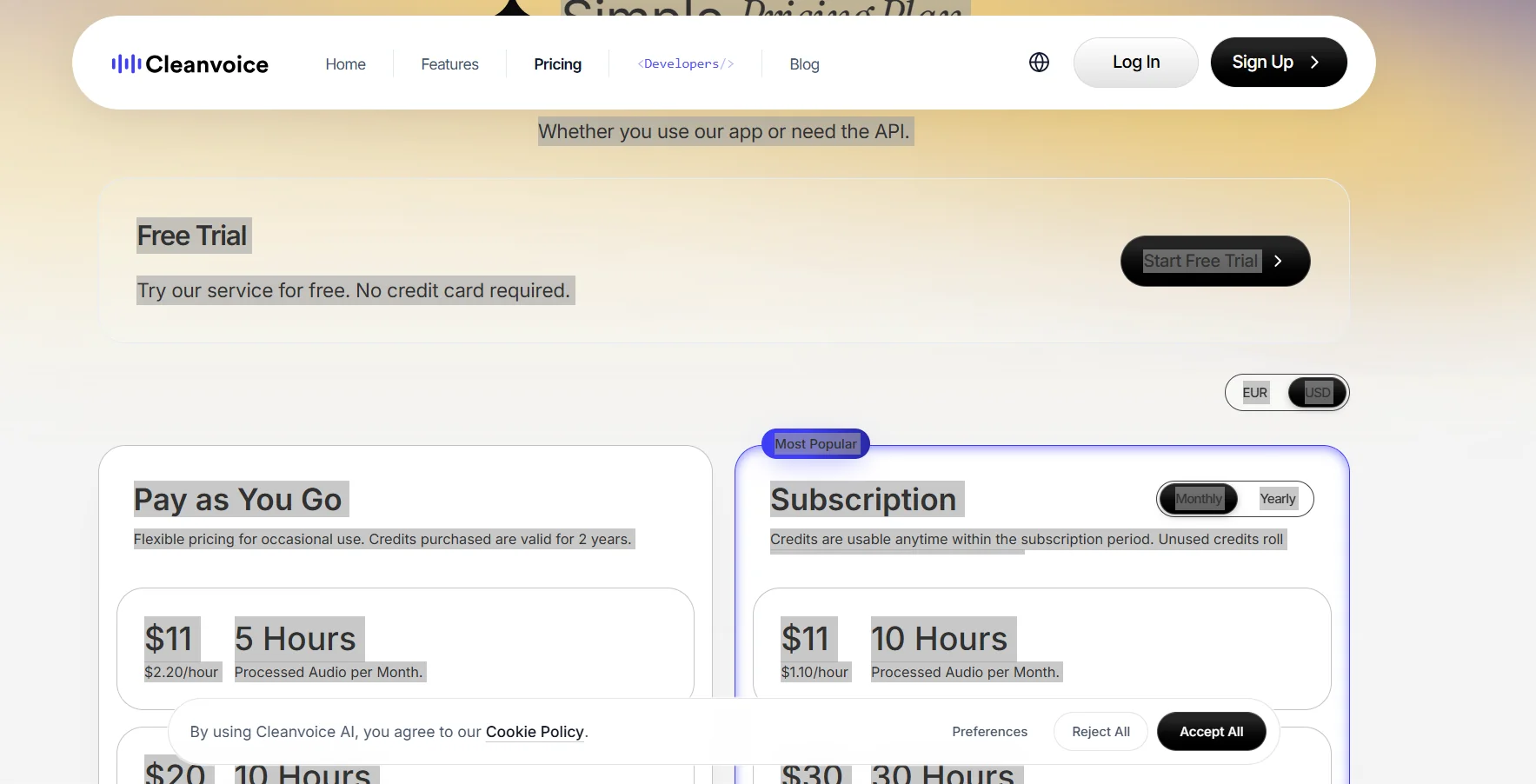
Pricing Model: 💰
🆓 Free Plan Details:
| Feature | Details |
|---|---|
| Free Trial | Available |
| Credit | 30 minutes |
| Content | Audio or Video |
| Credit Card | Not required |
| Purpose | 30-minute trial and cleanup of content |
Paid Plan Details: 💳
| Plan Type | Price | Features |
| Pay as You Go | $11 for 5 hours | $2.20 per hour, credits valid for two years |
| Pay as You Go | $20 for 10 hours | $2 per hour, and credits are valid for two years |
| Pay as You Go | $45 for 30 hours | $1.50 per hour, credits valid for two years |
| Monthly Subscription | $11 for 10 hours per month | $1.10 per hour, with the option to carry over unused credits |
| Monthly subscription | $30 for 30 hours per month | $1 per hour, with the option to carry over unused credits |
| Monthly subscription | $90 for 100 hours per month | $0.90 per hour, with the option to carry over unused credits |
Plans include essential features such as removing filler words, noise, and silence; cleaning up mouth and breathing sounds; improving audio quality with Studio Sound;editing podcast videos; and exporting the timeline.
Monthly subscriptions allow you to carry over unused credits up to three times the plan limit.
Note: The prices listed do not include value-added tax (VAT).
How to access the tool: 🧭
| How to Access | Availability |
| Web | Available |
| API | Available |
| Standalone Application | Not specified in the provided information |
| Add-on | Not mentioned in the provided information |
Demo link or official website: 🔗