Pixlr AI Video Generator
Description
️ Tool Name: 🖼
Pixlr AI Video Generator
Categories: 🔖
Text and Images to Video
Video, Editing, and Motion
Music and Effects Generation
Social Media Templates and Editing Automation
️ What does this tool offer? ✏
Pixlr AI Video Generator is a tool from Pixlr that uses artificial intelligence to create videos from text or images. Users can describe the scene they want using a text prompt, and the tool then converts the description into a video. Alternatively, users can upload a still image and turn it into a moving clip by adding realistic motion to the elements within it. The tool supports multiple video generation models, including Google Veo, Kling, and Seedance,allowing users to choose a model based on their needs in terms of speed and quality. (Pixlr)
In Text-to-Videomode, the user writes a description of the scene; this description can include the subject, location, mood, camera angle, and other details. In Image-to-Videomode ,the user uploads an image and can add a text description to direct the motion, such as a slow zoom, character movement, or waving. Pixlr notes that the tool can animate faces, landscapes, and product images with realistic motion.
The tool allows users to choose video quality levels based on three options listed on the current video generator page: Fast, using Seedance Lite for quick generation;Pro, using Kling V2 for high-quality motion; andUltra, using Google Veo for more cinematic and realistic results. Pixlr also notes that the available models may include additional models within the Pixlr AI ecosystem.
The tool supports the creation and export of HD videos in MP4format without watermarks,with the option to use different aspect ratios, including 16:9 for horizontal contentand 9:16 for vertical content intended for social media platforms. Pixlr notes that most videos are generated in less than 60 seconds, though generation time varies depending on the model used.
The tool can be used to create ads, product videos, marketing content, TikTok, Instagram, and YouTube clips, educational and training videos, explainer videos, and creative content. Pixlr also provides templates and examples for uses such as promotional ads, product showcases, and explainer and training videos.
The platform also allows you to create videos from text with scenes, transitions, and background music, as well as animate still images and add transitions and music to them to create clips suitable for promotions, branding, and social media.
What does it actually offer based on user experience? ⭐
Creating videos from text commands.
Converting still images into animated videos.
Directing motion through text prompts.
Animating faces, landscapes, and product images.
Use models such as Google Veo, Kling, and Seedance.
Offer Fast, Pro, and Ultra tiers to choose a model based on speed and quality.
Create HD videos in MP4 format.
Export videos without a watermark.
Support for 16:9 and 9:16 aspect ratios.
Create content for ads, social media, and product presentations.
Create educational, training, and explanatory videos.
Provide ready-to-use templates and examples for marketing and educational purposes.
Ability to add music and transitions in certain video creation modes.
Create most videos in less than a minute, depending on the template used.
Does it include automation? 🤖
Yes. The tool relies on AI-powered automated generation; the user either enters a text description or uploads an image, and the tool then selects a template and automatically generates the video. In Image to Video mode, the tool adds motion to the image based on the content and motion description, while Text to Video mode converts the text description into a video.
Pricing model: 💰
Freemium / Monthly or annual subscriptions with AI credits.
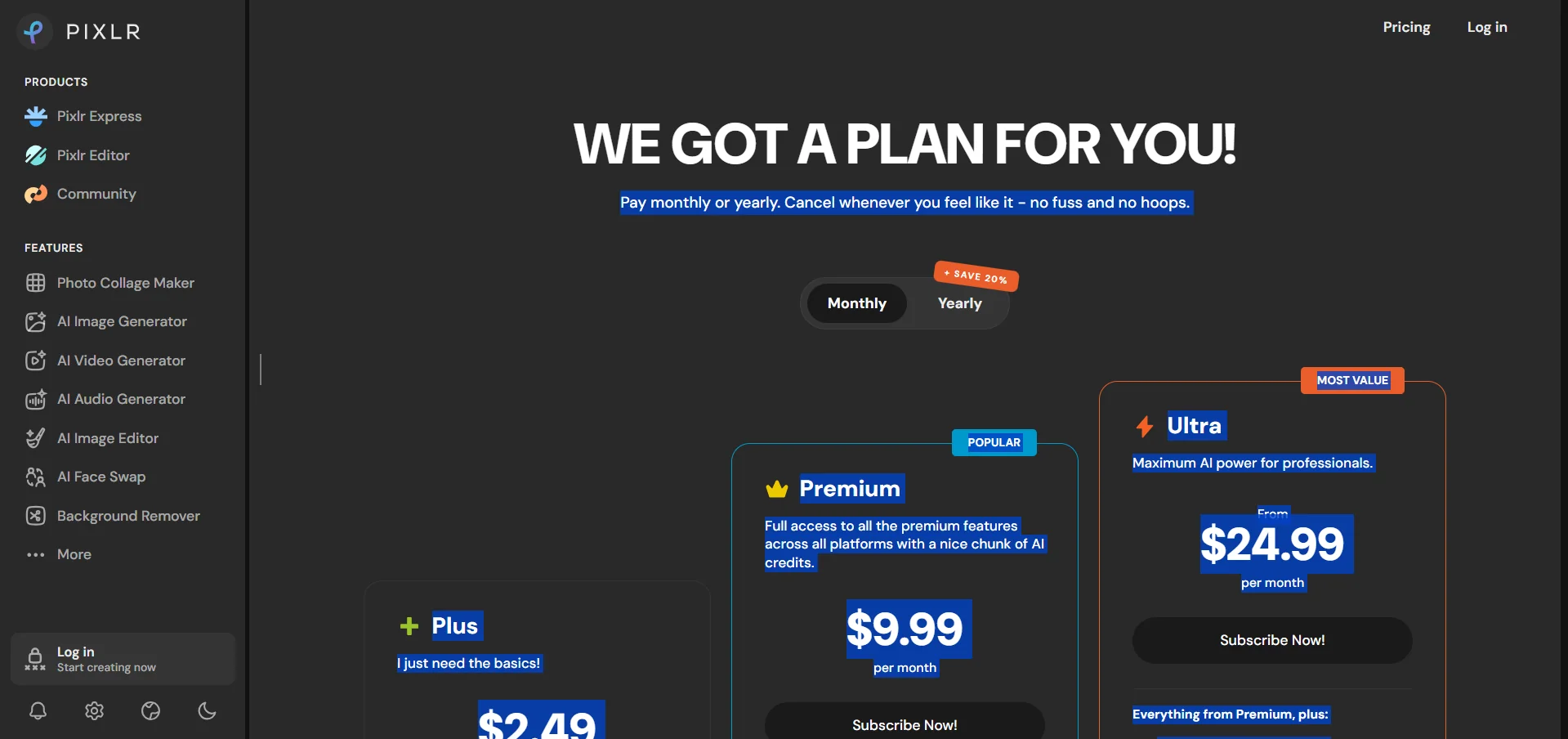
Pixlr allows you to use the video generator for free with a free account, and the official video generator page states that exported videos do not contain watermarks. In addition to the free version, Pixlr offers Plus, Premium, Ultra, and Ultra MAX plans on a monthly or annual subscription basis, with the option to purchase additional AI credits.
🆓 Free Plan Details:
| Feature | Details |
|---|---|
| Cost | Free |
| Video creation | Available with a free account |
| Text to Video | Available |
| Image to Video | Available |
| Templates | Templates such as Google Veo, Kling, and Seedance are available, with availability varying by service and account |
| Export | HD MP4 |
| Watermark | There are no watermarks on exported videos |
| Aspect Ratios | Includes 16:9 and 9:16 |
| Generation time | Most videos are under 60 seconds, depending on the template |
| Free credits | The video generator page does not specify a fixed numerical amount for free credits |
The information regarding free video generation and the absence of a watermark is confirmed by the official video generator page. However, the page does not specify a numerical value for the free credits allocated to the video generator, so no unconfirmed number has been added.
Paid plan details: 💳
| Plan | Monthly Price | Annual Price | Credits and Features |
|---|---|---|---|
| Plus | €2.49 per month | €1.99 per month when paying annually | No ads, unlimited saves, one AI generation at a time, 80 AI credits per month, or 960 credits valid for one year with an annual subscription, Pixlr estimates usage at approximately 80 Quick Edits, 16 Pro Edits, 80 Quick Edits, or 4 Quick Videos per month |
| Premium | €9.99 per month | €7.99 per month when paying annually | All Plus features, access to all photo, video, and audio templates, 4 simultaneous generations, 1,000 AI credits per month, or 12,000 credits valid for one year, a dedicated generation mode, and a large library of fonts, templates, elements, and animations; Pixlr estimates usage at approximately 1,000 quick photos, 200 professional photos, 1,000 quick edits, or 50 quick videos per month |
| Ultra | Starts at €24.99 per month | Starts at €19.99 per month when billed annually | All Premium features, unlimited Quick Image generation subject to the Fair Use Policy, all photo, video, and audio templates, 8 simultaneous generation processes, up to 10,000 AI credits per month, private mode and adult content, priority in the generation queue, and high-resolution extended export, with a credit limit of up to 5,000 professional images, 500 Ultra images, 10,000 professional edits, or 500 Quick videos per month |
| Ultra MAX | €49.99 per month | €39.99 per month when paying annually | The MAX version of Ultra with double the credits as shown on the pricing page; the page notes that Ultra MAX raises the limit to 10,000 credits per month instead of 5,000 |
The prices and features above are taken from Pixlr’s current official pricing page, which displays prices in euros on the referenced page.
How to access the tool: 🧭
| How to Access | Status |
|---|---|
| Web | Available |
| Android app | Available |
| iOS app | Available |
| Desktop | Available with a Pixlr subscription |
| API | Not mentioned in the official information consulted |
| Browser extension | Not mentioned |
Pixlr confirms that subscriptions provide access via the web, computers, and mobile devices using the same Pixlr account, and confirms that you can subscribe from the website or via the Android and iOS apps.
Trial link or official website: 🔗