Description

️ 🖼Tool Name:
MakeShorts

🔖 Categories:

  • Automation and Smart Bots
  • Content Management and Publishing
  • Social Media Templates and Video Editing Automation
  • Video, Editing, and Motion Graphics
  • Video Summarization and Clips
  • Text and Images to Video
  • Video Concepts and Scripts
  • Motion Graphics, Titles, and Subtitles
  • Text-to-Speech / Speech-to-Text
  • Editing/Optimization/Resolution Enhancement

️ ✏What does this tool offer?

MakeShorts offers an AI-powered platform for converting long videos into short (Shorts) that are ready for quick publishing. It helps content creators produce engaging clips for social media platforms by analyzing videos and automatically extracting the most engaging moments.

The tool aims to speed up the content creation process by up to 10 times compared to manual editing, with the ability to convert YouTube videos into short clips with a single click.

MakeShorts relies on a range of artificial intelligence technologies, including:

  • AI Clipping:
    Analyzes long videos and selects and creates the most engaging clips in seconds.
  • Autofocus Cropping:
    Converts landscape videos to portrait format suitable for platforms like TikTok and YouTube Shorts, while keeping the camera focused on the main speaker.
  • AI Subtitling:
    Adds accurate automatic subtitles to videos.
  • AI Social Captions:
    Creates relevant descriptions, titles, and hashtags to help improve content reach.

The platform also supports direct video uploads and the creation of an unlimited number of short clips depending on the plan, with the ability to produce high-quality videos, add logos, and store clips for varying lengths of time.

MakeShorts also offers features such as:

  • Automatic frame adjustment.
  • Automatic video trimming.
  • Subtitle generation.
  • Optimizing content for social media platforms.

What does it actually offer based on user experience?

  • Convert long videos into short clips ready for posting.
  • Automatically extract the best moments from videos using AI.
  • Quickly convert YouTube videos into Shorts.
  • Create clips suitable for TikTok and YouTube Shorts.
  • Add automatic subtitles to videos.
  • Create titles, descriptions, and hashtags for your content.
  • Convert landscape videos to portrait videos.
  • Keep the camera focused on the main speaker.
  • Create an unlimited number of short clips depending on your plan.
  • Add a brand logo in paid plans.
  • Store clips for varying periods depending on the plan.

🤖 Does it include automation?

Yes, MakeShorts relies on automation powered by AI technologies.

Automation includes:

  • Automatically analyzing long videos.
  • Identifying the most engaging moments.
  • Creating short clips without the need for manual editing.
  • Automatically trimming and resizing frames.
  • Automatically generating subtitles.
  • Generate titles, descriptions, and tags appropriate for the content.

💰 Pricing model:

Freemium (free plan + paid plans with monthly or annual subscriptions).

MakeShorts uses a credit-based system for video upload time, with the ability to download an unlimited number of short clips.

Plans are available with monthly or annual payment options, with a discount of up to 75% for annual subscriptions.

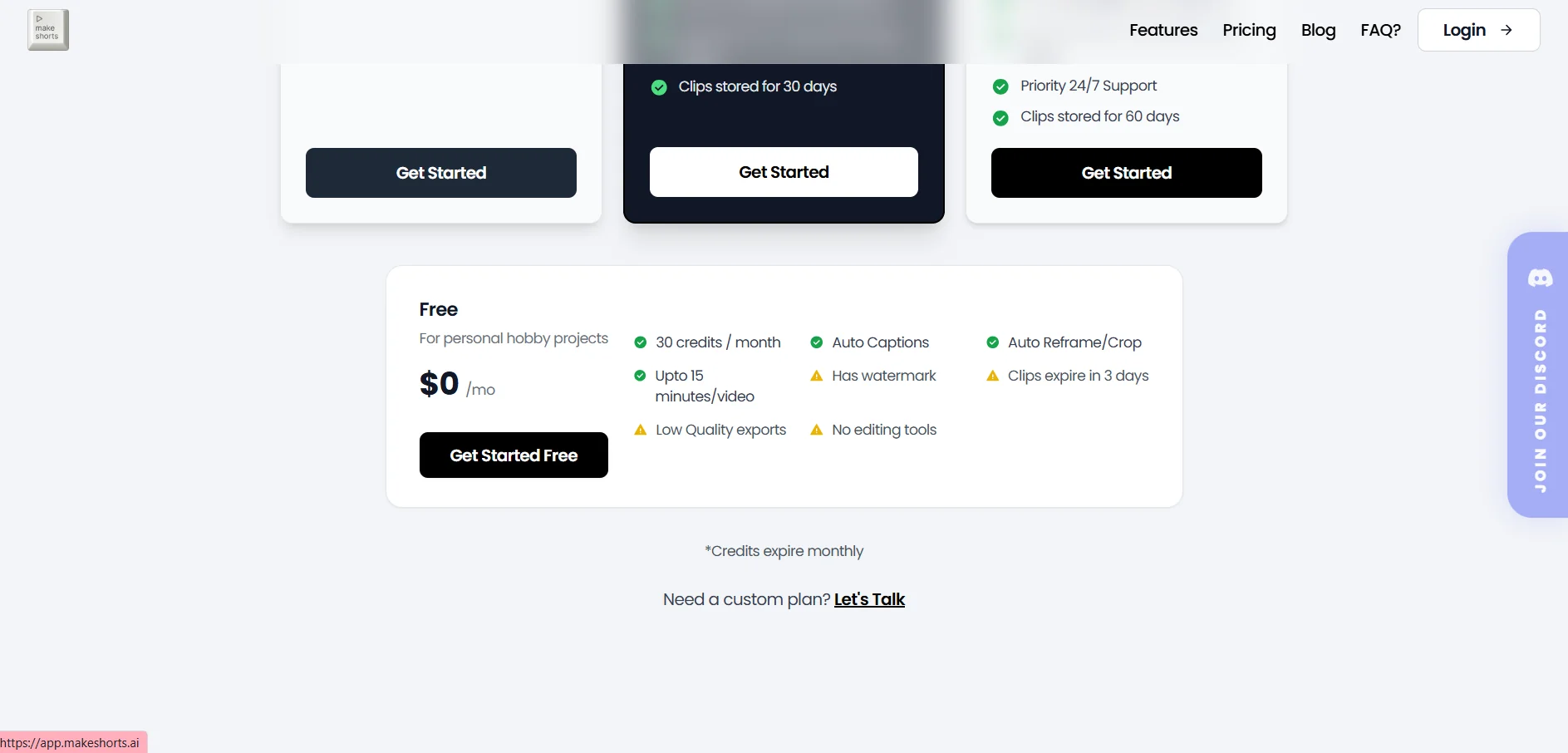
🆓 Free Plan Details:

FeatureDetails
Plan NameFree
Price$0 per month
Monthly Credit30 credits
UsagePersonal projects and experiments
Automatic translationAvailable (Auto Captions)
Reframe and CropAvailable (Auto Reframe/Crop)
Supported Video LengthUp to 15 minutes per video
WatermarkPresent
Export QualityLow
Clip expirationAfter 3 days

💳 Paid Plan Details:

PlanPriceBenefits
Lite$6 per month when paying annually instead of $12 per month150 credits per month, annual value of $72, unlimited short clips without a watermark, 150 minutes of video uploads per month, support for videos up to 45 minutes, High quality, process one video at a time, upload files up to 800MB, clip storage for 10 days
Plus$9.75 per month when paying annually instead of $39 per month350 credits per month, annual price of $117, unlimited short clips without watermarks, upload 350 minutes of video per month, support for videos up to 2 hours, Process 3 videos simultaneously, upload files up to 3GB, add a brand logo, 30-day storage
Pro$19.75 per month when paid annually instead of $79 per month800 monthly credits, annual value of $237, all features of previous plans, upload 800 minutes of video per month, support for videos up to 4 hours, Process 6 videos simultaneously, upload files up to 6GB, add a logo, 24/7 priority support, 60-day storage

🧭 How to access the tool:

MethodDetails
WebWorks via the MakeShorts platform
Upload VideoUpload videos directly to the platform
ExportDownload short clips based on your plan
Supported platformsTikTok, YouTube Shorts, and social media platforms

🔗 Demo link or official website:
https://www.makeshorts.ai/

Pricing Details

MakeShorts offers several subscription plans based on a credit-for-video-upload-minutes system, with the ability to download an unlimited number of short clips. Plans are available with monthly or annual payment options, with a discount of up to 75% for annual subscriptions. The Free plan is available for $0 per month and is intended for personal projects and experimentation. It provides users with 30 credits per month and features such as Auto Captions, Auto Reframe/Crop, (Auto Reframe/Crop), and support for videos up to 15 minutes long per clip. However, it includes a watermark, the export quality is low, and clips expire after 3 days. The Lite plan is available for $6 per month when paid annually instead of $12 per month, with a total of 150 credits per month and an annual cost of $72. This plan allows you to create an unlimited number of short clips without a watermark, upload a total of 150 minutes of video per month, with support for videos up to 45 minutes long, high-quality output, and the ability to process one video at a time, and the ability to upload files up to 800MB in size, with clips stored for 10 days. The Plus plan is priced at $9.75 per month when paid annually instead of $39 per month, with 350 credits per month and an annual cost of $117. The plan includes unlimited watermark-free short video creation, uploading up to 350 minutes of video per month, support for videos up to two hours long, simultaneous processing of 3 videos, uploads of files up to 3GB in size, the ability to add a brand logo, and 30 days of clip storage. The Pro plan is the highest tier and costs $19.75 per month when paid annually instead of $79 per month, with 800 credits per month and an annual cost of $237. It includes all the features of the previous plans, plus the ability to upload 800 minutes of video per month, support for videos up to 4 hours long, simultaneous processing of 6 videos, the ability to upload files up to 6GB in size, the option to add a logo, 24/7 priority support, and 60 days of video storage.