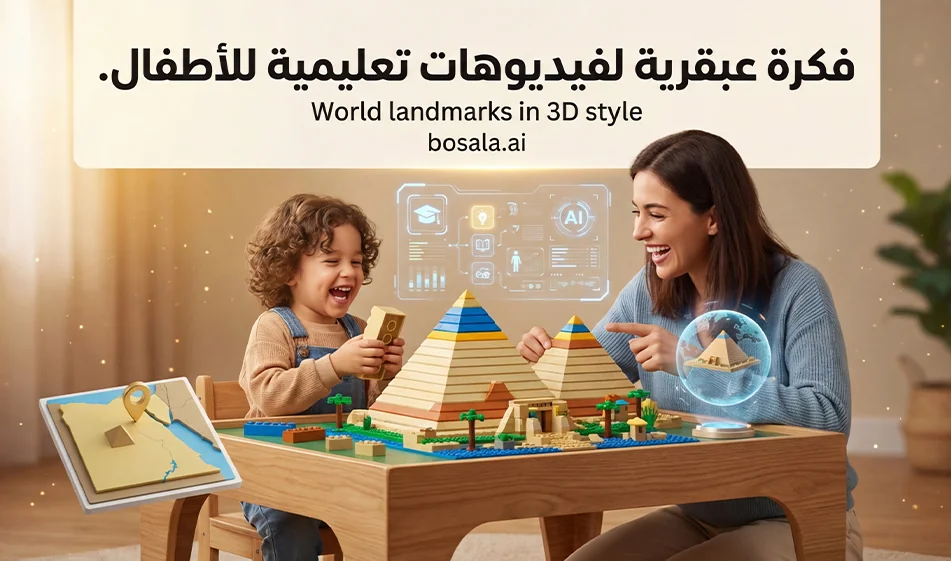
How to Create Successful Videos to Teach Children About the World in 3D
The idea
Instead of a boring traditional lesson, we turn the information into a fun short story. A child and his mother play with Legos and build a famous landmark, such as the Pyramids. While playing, the mother says a simple educational sentence about the landmark’s name, location, and just one piece of information. The result is a lighthearted educational video that’s easy to share because kids love building, stories, and movement.
Link to the website used: https://digen.ai/
Why this approach works
It links learning with play, which encourages the child to watch the video until the end
It presents one clear piece of information instead of a lot of information
The 3D scene is visually appealing and suitable for reels and shorts
It can easily be turned into a series, with each episode focusing on a new landmark
The Golden Rule
Each video answers only three questions
What is the teacher’s name?
Where is it located?
One short piece of information about them
Structure of a successful video
Recommended duration: 20 to 30 seconds or 30 to 45 seconds, depending on your platform
Style: 3D, childlike, cute, and cheerful colors
No filler and no long explanations
Suggested scene breakdown
Scene 1: Quick hook, 0 to 2 seconds
Shot of the Lego quickly taking shape, with the child’s surprise
Scene 2: Building (2–12 seconds)
The child and mother assemble the pieces with close-ups of the hands and pieces
Scene 3: Information Moment 12 to 22 seconds
The mother points to the model and states the educational information in a short sentence
Scene 4: Conclusion 22 to 30 seconds
The child enthusiastically repeats the name or asks a simple question
followed by a call to action: “Which teacher would you like to see in the next episode?”
Tips for the series’ success
Keep the same characters in every episode—the child and mother with the same appearance and clothes
Keep the same setting—a playtable inside a cozy home
Change only the teacher, the country, and the information
Keep the language very simple and appropriate for ages 6 to 10
Add a small map or flag later in post-production if desired, but do not include it text within the animation
Make the audio clear and use light sound effects
How to create the script and animation
Step 1: Write a short script for the episode
Write just two lines of dialogue
Mother: One instructional sentence
Child: One short interactive sentence
Step 2 Write a scene description for generation
Write a clear description of 3D characters and the Lego environment
Set the video aspect ratio to 9:16
Set the duration of each shot
Request smooth camera movement and close-ups of the Lego
Step 3: Generate the video as short clips
It is preferable to generate 3 short clips and then combine them
Quick building clip
Mother’s explanation clip
Child’s closing clip
Step 4: Merge the clips and add simple elements
Add the teacher’s name and country as text in clear Arabic script
Add soft sound effects for the Lego pieces and the child’s smile
Ready-to-use script for the episode: Example of the Pyramids in Egypt
Mother’s dialogue
These pyramids are called the Pyramids of Giza. They are in Egypt, near the city of Cairo, and were built thousands of years ago
Child’s dialogue
Wow, it’s so big! Should we build another pyramid in the next episode?
Ready-to-use description Full shot
A 3D video in a cute, childlike style similar to Pixar, vertical 9:16, duration 25 seconds. A 7-year-old Arab boy and his mother are sitting at a playtable in a warm room lit by soft daylight. In front of them are gold and yellow LEGO pieces. They are building a model resembling the Pyramids of Giza. Close-ups of the hand assembling the pieces, followed by a wider shot of the model as it is completed. The mother points to the pyramid and says a short sentence in Classical Arabic about the pyramids, their location in Egypt near Cairo, and one simple fact. The child smiles and claps enthusiastically. Smooth camera movement, cheerful colors, soft textures, clear facial expressions, no text on screen, no subtitles, no exaggeration—an enjoyable educational video for children.
Ready-made ideas for future episodes using the same format:
Eiffel Tower, France – fact: it is a symbol of Paris
Statue of Liberty, USA – fact: it was a gift from France
Great Wall of China – fact: it is very long
Colosseum, Italy – fact: it is an ancient theater
Petra, Jordan – fact: it is a city carved into the rock
Conclusion: Compass
This template turns geography into a fun game and series. Each episode features one landmark, one fact, and a simple interactive element. Over time, you’ll have educational content that captivates children and keeps them coming back for more.